We’ve released Orviss 2.0.0 for Mac, iPhone, iPad and Windows. Starting with 2.0, you can share files project by project. You choose what each person can do, and even large materials of up to 10 GB per file can be shared on an affordable plan.
Work materials tend to scatter: notes in a notes app, large files in cloud storage, conversations in chat. With Orviss, whatever you put in a project folder — notes and materials alike — reaches the people you share it with, just as it is.
Share each project with just the people who need it
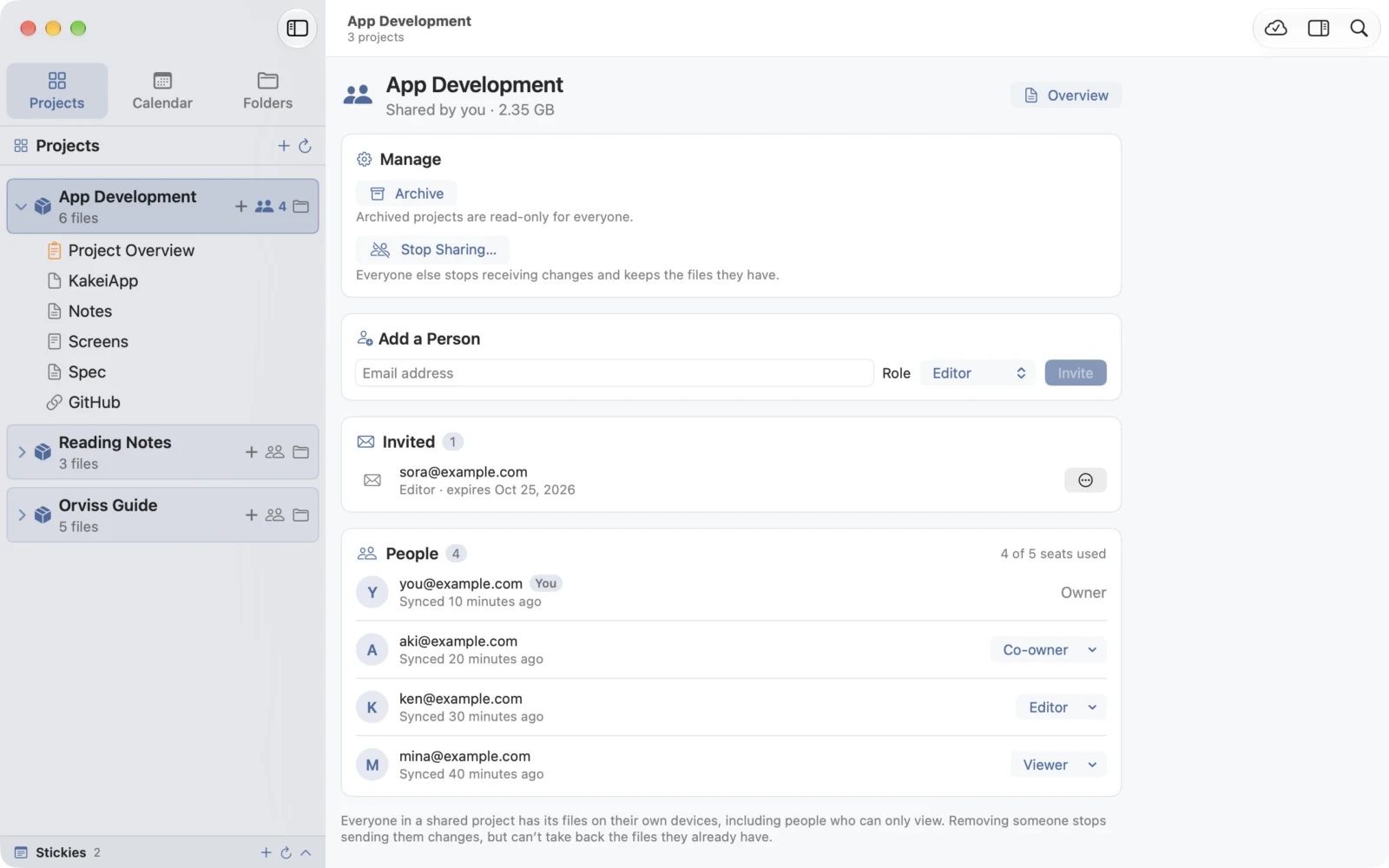
In Orviss, you share one project at a time. Share project A with a client and project B with your team, for example. People receive only that project’s folder; your other projects and your daily journal are never shared.
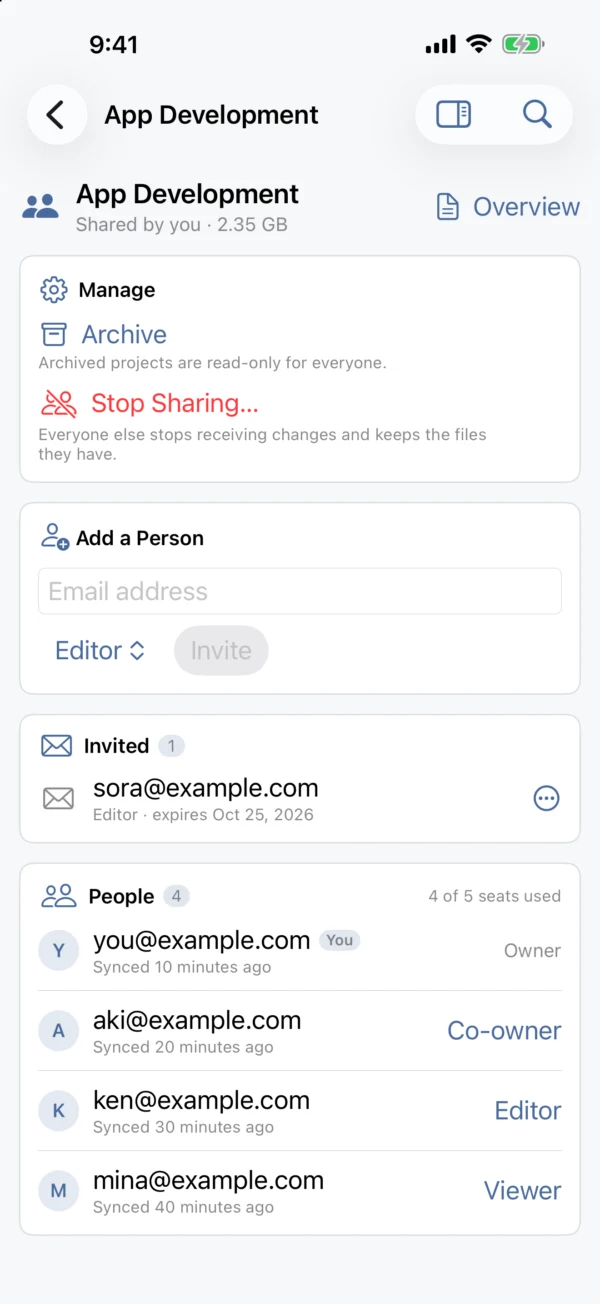
- Press a project’s share button, enter the person’s email address and choose a role. Send them the invitation link or code, and they accept it in their own Orviss
- The people you invite only need a free Orviss account — not Orviss Pro
- A shared project arrives in everyone’s Projects folder as ordinary files, whether they use a Mac, a Windows PC, an iPhone or an iPad
- Not just notes: PDFs, images, videos — any file you put in the folder is delivered
- If you stop sharing, everyone else keeps the files they have as an ordinary folder
If you’re a freelancer, for instance, you can keep meeting notes, quotes and deliverables in a project for each client and invite the client to it. No more email attachments or links to yet another storage service.
Choose permissions for each person
When you invite someone, you choose their role. Make a client a viewer and a collaborator an editor, for example.
| Role | Read | Add and edit files | Invite and manage members |
|---|---|---|---|
| Owner | ✓ | ✓ | ✓ |
| Co-owner | ✓ | ✓ | ✓ |
| Editor | ✓ | ✓ | — |
| Viewer | ✓ | — | — |
- Notes a viewer opens are read-only, so nothing gets changed by accident
- You can change roles later and remove members. You can also hand over ownership to another member
- When a project is finished, archive it to make it read-only for everyone. You can unarchive it later
- You can have 1 co-owner on Orviss Pro and up to 2 on Orviss Pro 5 and above
Up to 10 GB per file, at an affordable price
Sharing in Orviss passes the files in your project themselves. Videos, RAW photos, design data, large PDFs and slide decks reach the other person simply by sitting in the folder. A single file can be up to 10 GB on Orviss Pro 10 and above, and up to 5 GB on Orviss Pro and Orviss Pro 5.
Note-taking apps often limit how large an attached file can be.
| Service and plan | Maximum size per file |
|---|---|
| Orviss Pro 10, Pro 50, Pro 100 | 10 GB |
| Orviss Pro, Pro 5 | 5 GB |
| Notion paid plans | About 5 GB |
| Obsidian Sync Plus | 200 MB |
Figures for other services were checked on their official websites on October 25, 2026.
The price is kept low, too. The app and the Orviss account are free, and sync and sharing come with Orviss Pro, a subscription. Because the people you invite only need a free account, one subscription on the sharing side is all it takes.
| Plan | People you can share with | Storage | Per file |
|---|---|---|---|
| Orviss Pro | 2 | 50 GB | 5 GB |
| Orviss Pro 5 | 5 | 100 GB | 5 GB |
| Orviss Pro 10 | 10 | 200 GB | 10 GB |
| Orviss Pro 50 | 50 | 500 GB | 10 GB |
| Orviss Pro 100 | 100 | 1 TB | 10 GB |
- Each plan is available monthly or yearly, and a yearly plan costs the same as 10 months (2 months free). Prices in your currency are shown on the App Store and in the app before you subscribe
- On every plan, you can sync as many of your own devices as you like
- Ending Orviss Pro never deletes anything in your Orviss folder
Try it for free
Keep notes and large materials together by project, and give each person the access they need. That’s what Orviss 2.0 is for. The app is free, and on a single device you don’t even need an account.
Orviss runs on macOS 26, iOS 26, iPadOS 26 and Windows 11 version 22H2 or later. Sharing needs an internet connection and an Orviss account.