

Why ReMaster
- AI super resolution up to 4× and 4K
- 30fps to smooth 60fps
- Batch processing for whole folders
- iPhone, iPad, Mac — and now Windows
- MOV, MP4, M4V, JPEG, PNG — plus WMV on Mac and Windows
- 100% on-device, private by design
Articles about ReMaster
How-tos, examples and news about ReMaster.

Remaster whole folders of memories at once: ReMaster’s new Memory Remaster mode
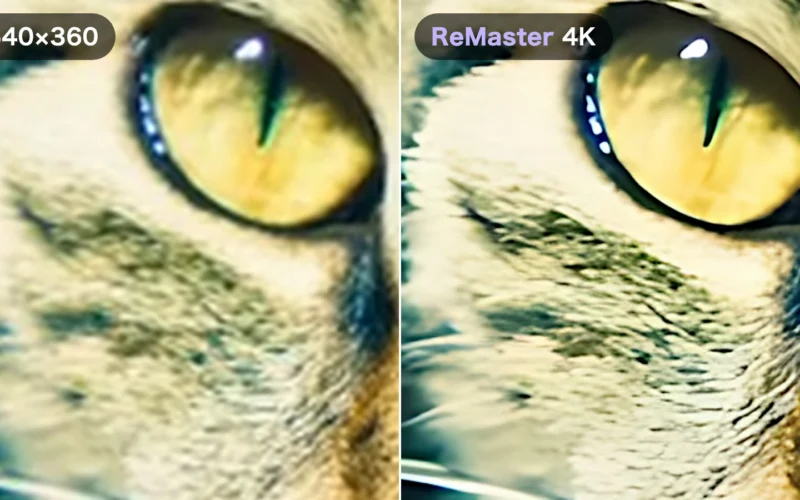
Watched full screen, a 640×360 video is stretched 36 times — why ReMaster turns it into 4K
ReMaster, the AI video upscaler, is now available for Windows

How to upscale old videos on iPhone with AI — using ReMaster and how it works
What ReMaster can do
Straight from your Photos library
Pick videos and photos right from your camera roll, and save the results back to your photo library. Folders in the Files app work too. On a Mac or Windows PC, just drop files or folders onto the window.


AI super resolution
Powered by Real-ESRGAN running entirely on-device, ReMaster reconstructs lost detail as it enlarges — up to 4× sharper, all the way to 4K. A faster Standard (Lanczos) mode is there when you're in a hurry. On Windows, it runs on your PC's GPU through DirectML.
Smooth 60fps with AI frame interpolation
Turn 30fps video into silky-smooth 60fps. Advanced frame interpolation (RIFE) generates natural in-between frames so motion feels alive again.


Batch processing
Select multiple items in the picker — or point ReMaster at a folder — and it remasters every video and photo inside, one after another. Perfect for reviving an entire archive of memories.
Wide format support
Bring in what you have and choose what you get back.
- Video: MOV, MP4 and M4V — plus WMV on Mac and Windows, and MPG / MPEG on Windows
- Photos: JPEG and PNG (on iPhone, iPad and Mac, HEIC is converted automatically on import)
- Output: MP4 / MOV / JPEG / PNG
- On Windows, interlaced camcorder footage is deinterlaced automatically
Private by design
Every pixel is processed locally using the Apple Neural Engine and GPU — or, on Windows, your PC's GPU. Your videos and photos never leave your device — and no account is required.
ReMaster — questions and answers
Are my videos uploaded anywhere?
No. All processing runs on your device using the Apple Neural Engine and GPU (on Windows, your PC's GPU). Nothing is sent to a server, and there is no account to create.
How long does it take?
It depends on your device, the length of the video and the settings you choose. AI super resolution to 4K is the most demanding; the Standard (Lanczos) mode is much faster when you need a quick result.
What does ReMaster Premium do?
ReMaster is free to use. Premium is a one-time purchase that removes the watermark from exported videos.
Which formats are supported?
MOV, MP4 and M4V for video — plus WMV on Mac and Windows, and MPG / MPEG on Windows; JPEG and PNG for photos (on iPhone, iPad and Mac, HEIC is converted automatically on import). You choose the output format: MP4, MOV, JPEG or PNG.
Is there a Windows version?
Yes. ReMaster for Windows is free on the Microsoft Store and runs on Windows 11 (22H2 or later). AI super resolution and AI frame interpolation need DirectX 12 graphics. On Windows, ReMaster Premium is a Microsoft Store add-on, purchased separately from the iPhone, iPad and Mac version.
Can ReMaster open old WMV videos?
Yes, on a Mac or Windows PC: the Mac and Windows versions open WMV files directly, and the Windows version opens MPG / MPEG too. The iPhone and iPad versions don't support WMV, so convert the video to MP4 first.
Can I upscale an old video on my iPhone?
Yes. Pick a video from your Photos library and ReMaster enhances it up to 4K on the device itself — no upload, no account, no subscription.
Does it enhance photos too?
Yes. The same AI super-resolution runs on photos, and you can queue several files and process them in one batch.