Whether on a phone, a computer or a TV, we usually watch videos full screen. A low-resolution video is then stretched a lot to fill the screen.
| Screen | 640×360 video | 4K (3840×2160) video |
|---|---|---|
| Full HD TV or monitor (1920×1080) | Enlarged 3× each way | Reduced to 1/2 |
| MacBook Air 13-inch (2560×1664) | Enlarged 4× each way | Reduced to 2/3 |
| 4K TV or monitor (3840×2160) | Enlarged 6× each way | Shown as is |
Play a 640×360 video full screen on a 4K TV, for example, and each pixel of the video is stretched 6 times in each direction — over 36 pixels of the screen. That is why edges blur and the whole picture looks soft. In a 4K video, one pixel stays one pixel. On a computer or a Full HD TV, it is even scaled down, so it looks sharper still.
ReMaster uses AI to turn low-resolution videos into 4K and other higher resolutions, so they look much less rough when you watch them full screen.
Compare them full screen
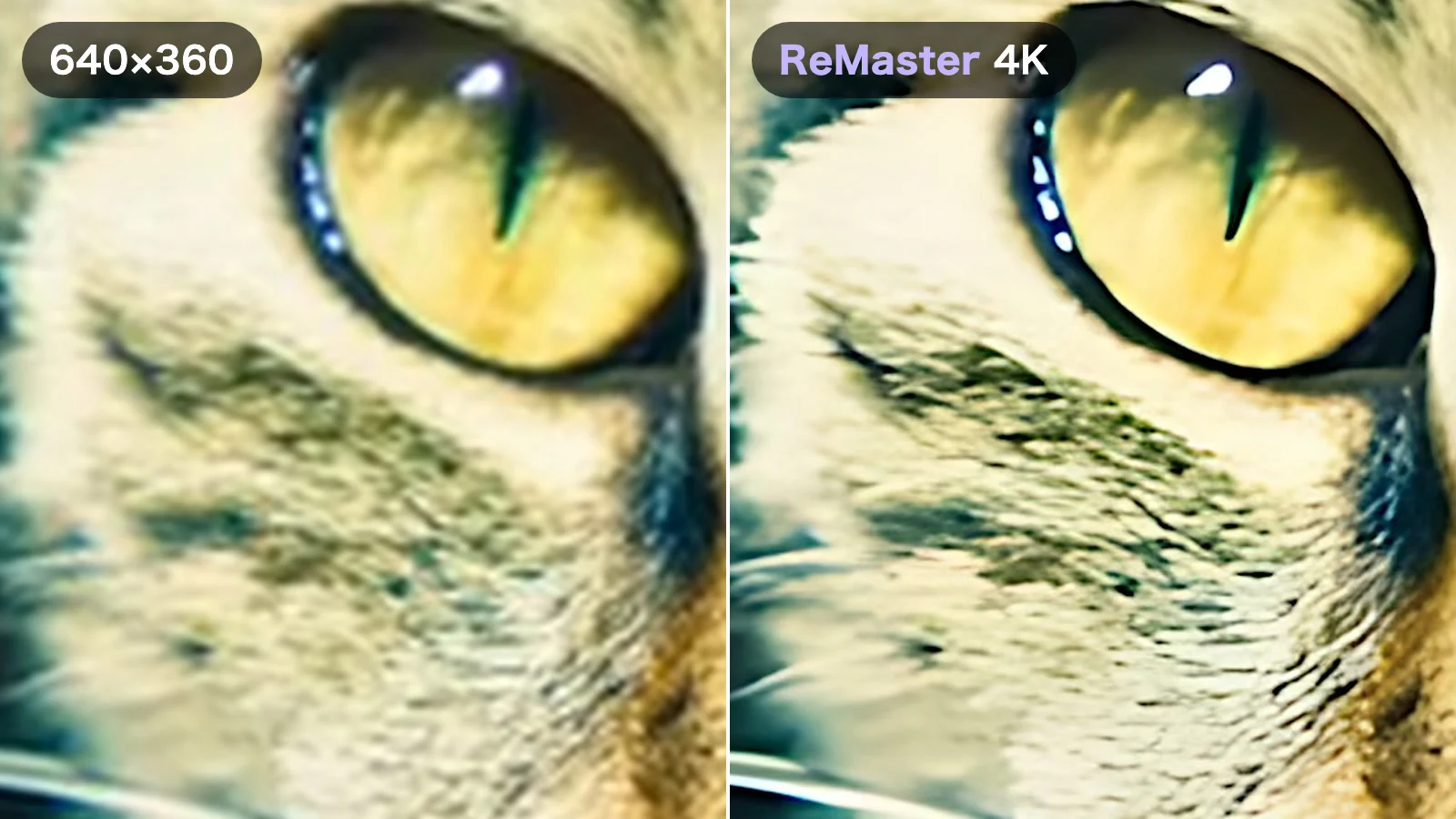
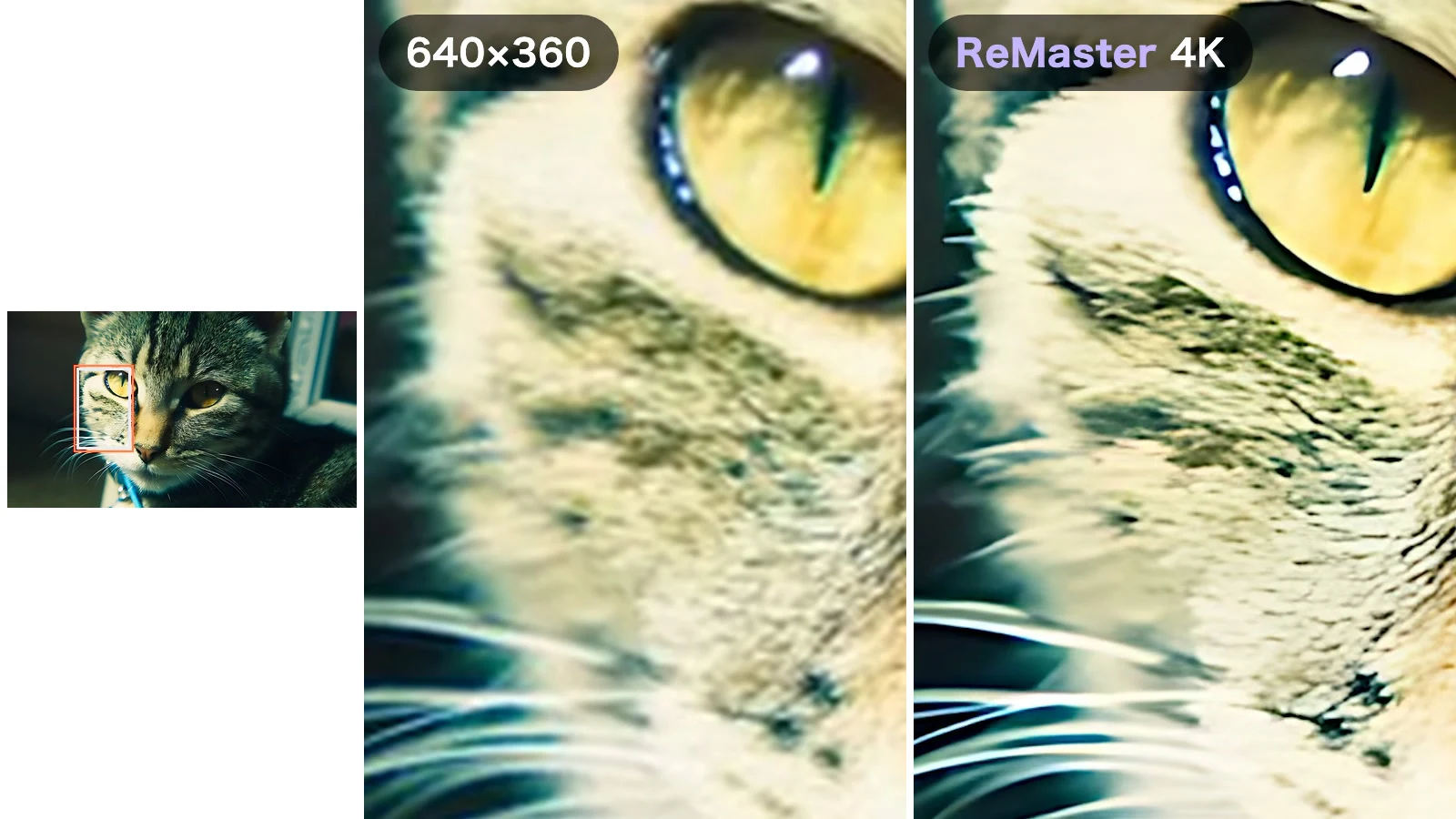
We took a 640×360, 24fps video of a tabby cat and turned it into 3840×2160 (4K) at 60fps with ReMaster. In the video below, the left half is the original and the right half is the ReMaster export. Play it full screen and compare.
Full screen, the fur and whiskers on the left are smeared and the whole picture is soft. On the right, you can see each whisker and the stripes in the fur.
The AI lives inside the app
ReMaster carries its AI models inside the app: Real-ESRGAN to raise the quality and RIFE to smooth out motion. Everything is processed on your iPhone, iPad, Mac or Windows PC, and your videos are never sent to a server. There are no uploads to wait for, no size limits and no account to create.
Not just resolution, but smoothness too
Besides enlarging up to 4× with AI Super Resolution, ReMaster can turn 24fps or 30fps video into 60fps with frame interpolation. It estimates the motion between two frames and creates new frames in between. The right half of the comparison video went from 24fps to 60fps.
Old file formats, as they are
Video in MOV, MP4 and M4V — plus WMV on Mac and Windows, and MPG (MPEG) on Windows. Photos in JPEG and PNG. Videos sitting on an old PC or digital camera can go in as they are, without converting them first.
How much you notice depends on the subject
For both upscaling and frame interpolation, the effect varies a lot from video to video.
- Upscaling: the difference is easiest to see in fine, well-defined detail — whiskers and fur, hair, text. Footage that is soft to begin with, such as out-of-focus shots or old film transfers, changes less. And because the AI estimates and adds detail that wasn’t captured, very fine areas can take on a painterly look
- Frame interpolation: it stands out in footage with steady motion, such as a panning camera or people and animals walking or running. In a video like our cat, which barely moves, 60fps makes only a small difference. Around scene changes, interpolated frames can look unnatural
Start with a short video and compare the settings. For how to use the app and how it works, see “How to upscale old videos on iPhone with AI”.
ReMaster is free to use. ReMaster Premium, a one-time purchase, removes the watermark from exported videos.
→ View on the App Store (iPhone, iPad, Mac)
→ View on the Microsoft Store (Windows)
Video: Marc Espejo (Pexels)