
Why Galna
- Native month and week views
- Drag & drop to reschedule
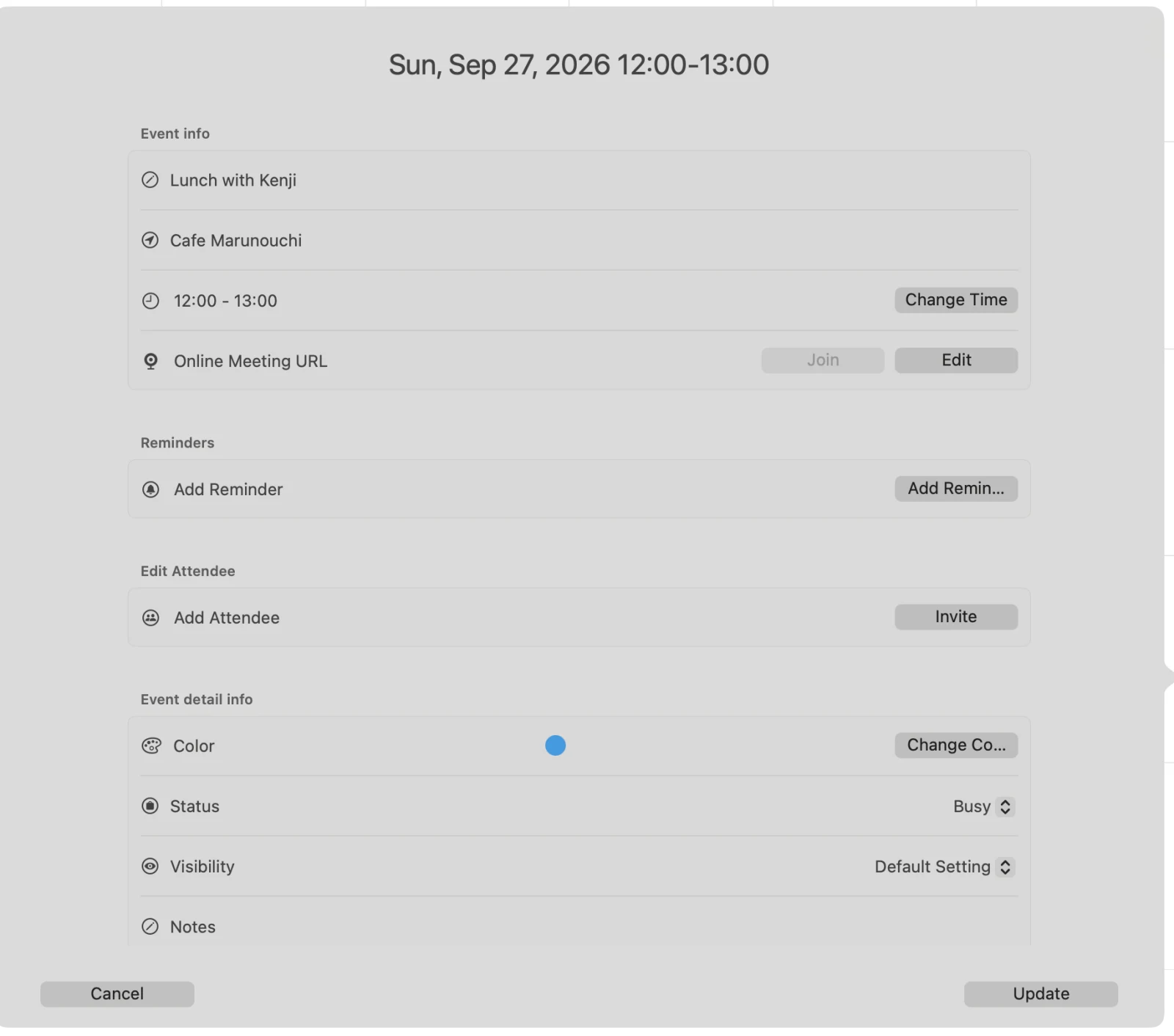
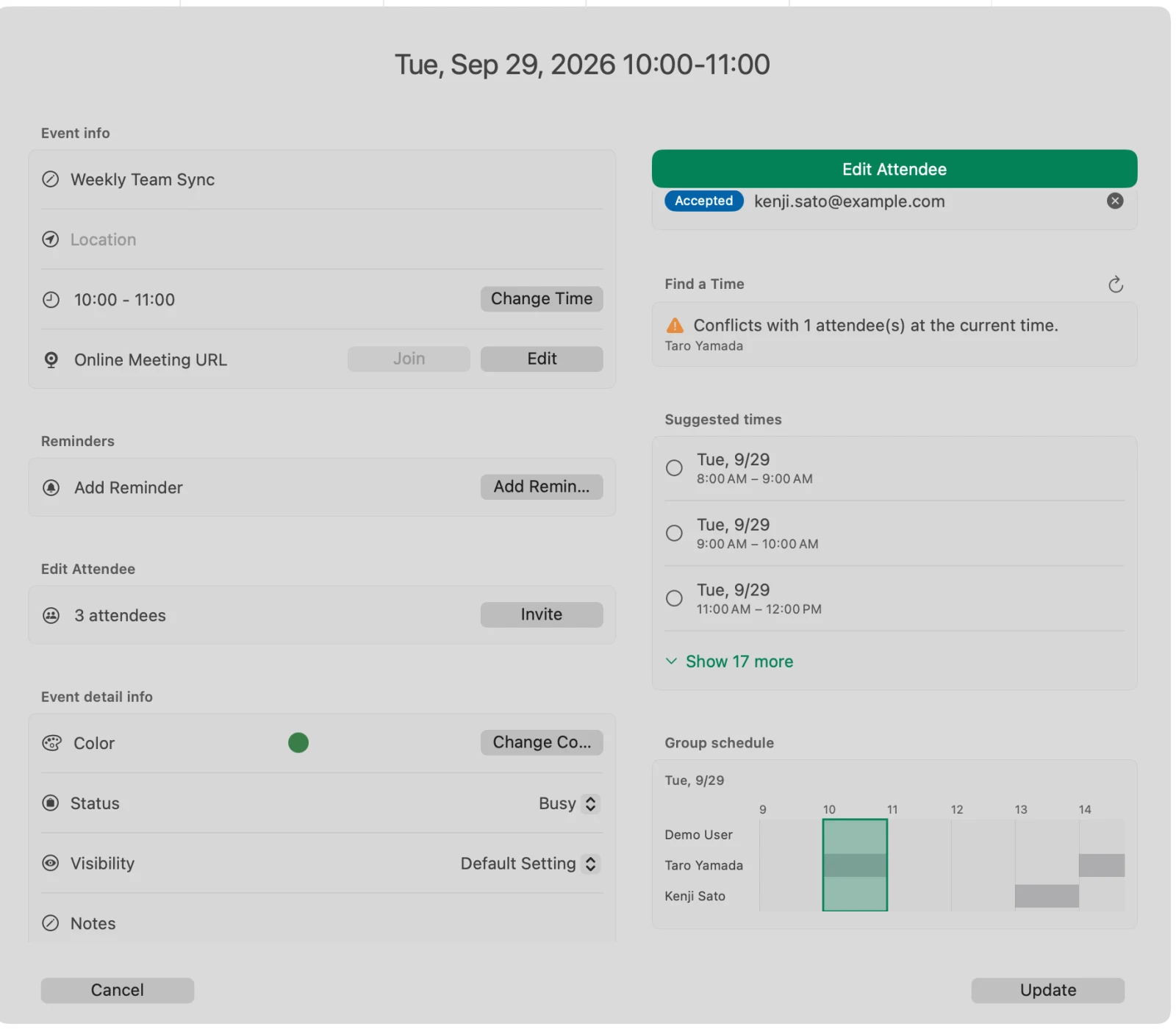
- Finds a time that works for everyone
- Google Meet links in one click
- Lives in your menu bar or notification area
- Japanese holidays and rokuyō
- Available for Mac and Windows
Articles about Galna
How-tos, examples and news about Galna.
For people who don’t want to use Google Calendar in a browser
Show the Japanese rokuyo (Taian, Butsumetsu) in Google Calendar: one setting in Galna puts them next to the dates
Schedule meetings without the back-and-forth: see when every attendee is free with Galna, an app for Google Calendar
Galna, our Google Calendar app, is now available for Windows
Use a dedicated app for Google Calendar: how to keep work and personal calendars separate on your Mac
3 ways to use Google Calendar on your Mac
What Galna can do
Fast, light, and truly native
Beautiful month and week views with native performance, on Mac and on Windows. Double-click to create an event, drag and drop to reschedule, and drag the edges of an event to change its duration. On the Mac you can also copy and paste events and delete with the Delete key — it works the way a Mac should, with full dark mode support.

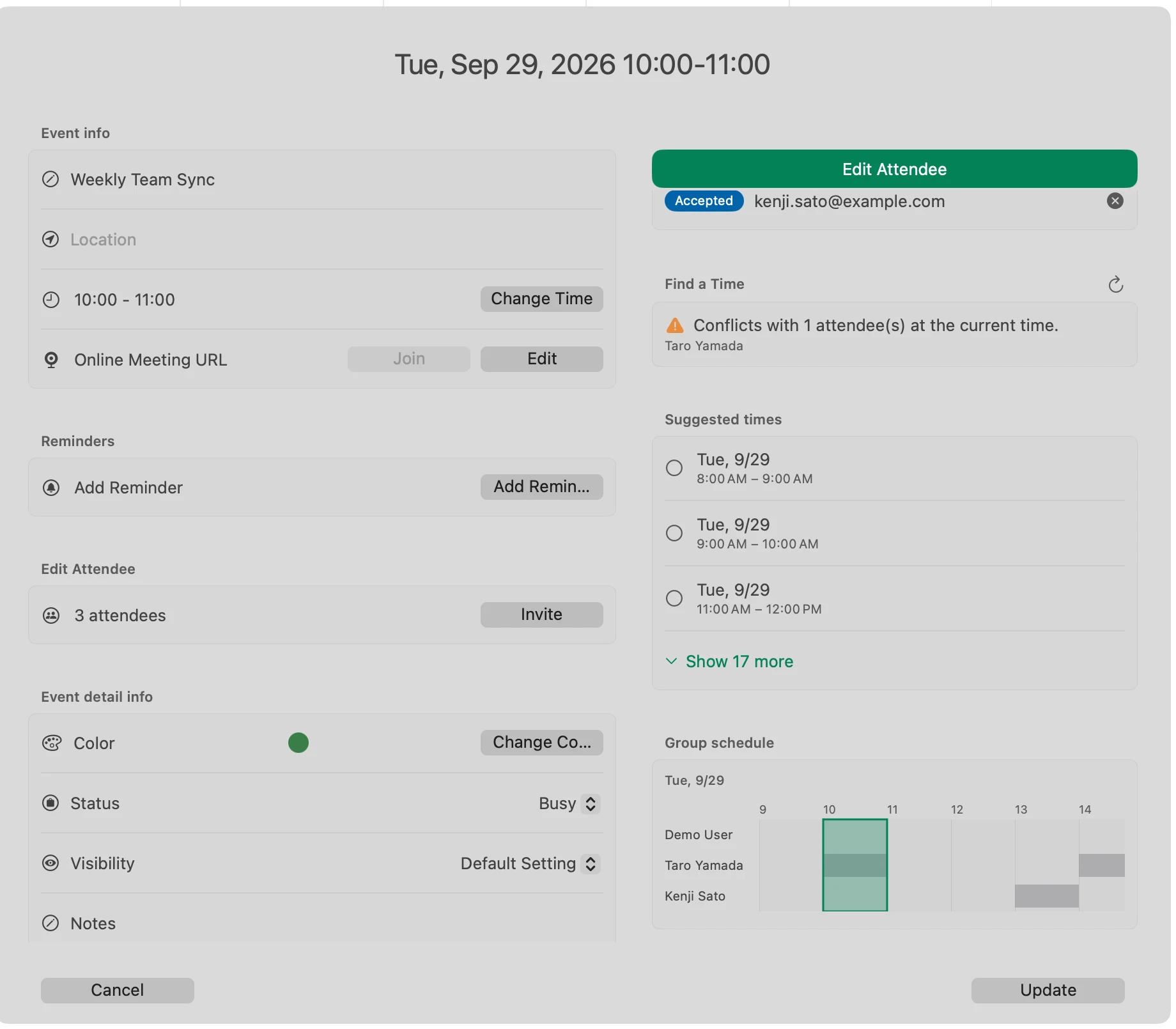
Find a time that works for everyone
Add attendees and Galna automatically checks everyone's availability. Apply a suggested meeting time with one click, or drag the event bar on the group schedule timeline to fine-tune it. Create a Google Meet link in one click; the Mac version recognizes Zoom and Teams URLs too.
Everything you need to manage your schedule
Full recurring events — daily, weekly, monthly, yearly, the nth weekday, with an end date or a count. Invite attendees and respond to invitations with autocomplete from your contacts. Attach Google Drive files, get reminders in Notification Center on the Mac or as Windows notifications, search everything, and work across multiple Google accounts and windows.
- Recurring events with every rule Google Calendar supports
- Invitations and RSVPs, with contact autocomplete
- Google Drive attachments
- Reminders in macOS Notification Center or as Windows notifications
- Powerful search, multiple accounts, multiple windows

Always within reach
On the Mac, Galna lives in your menu bar; on Windows it stays in the notification area. Either way, today's agenda is one click away — and on the Mac the weather forecast shows right on your calendar.
Now on Windows 11, too
Galna Calendar, the Windows version of Galna, is available on the Microsoft Store. Month and week views, drag-to-edit, repeating events, attendees with “Find a Time”, Google Meet, Windows notifications, a small calendar in the notification area and the rokuyō — the same idea as the Mac version, built for Windows 11. Free for 7 days, then a one-time purchase (bought separately from the Mac version).
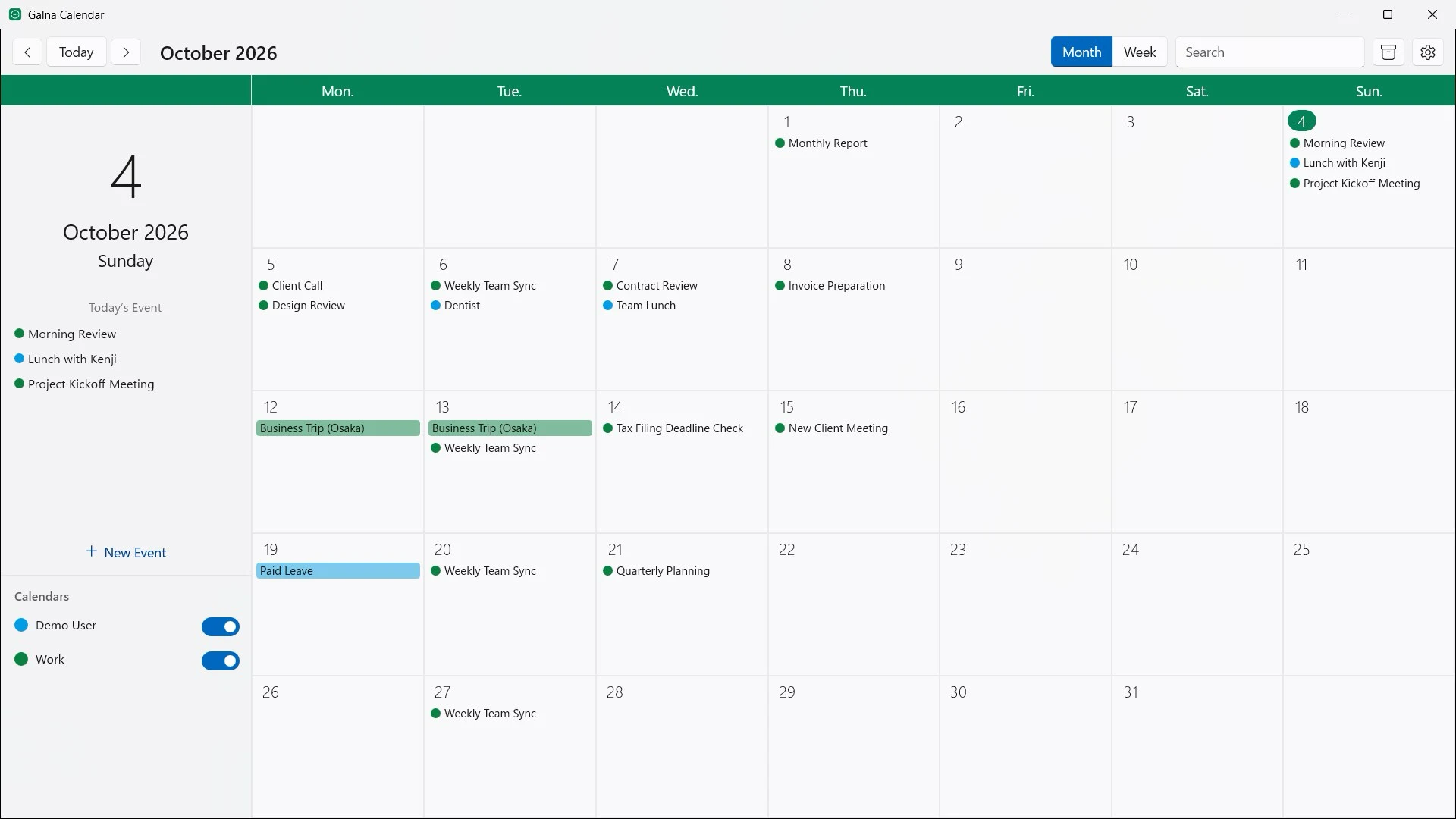
Made with Japan in mind
Japanese public holidays and rokuyō (taian, butsumetsu and the rest) are shown right on the calendar (the Windows version shows the rokuyō) — something Google Calendar itself has never offered.
Galna — questions and answers
Do I need a Google account?
Yes. Galna is built exclusively for Google Calendar, so you sign in with a Google account. You can add several accounts and see them side by side.
Does Galna send my calendar data anywhere?
No. Your calendar data is processed only on your own Mac or PC and is never sent to our servers. Galna talks directly to Google's calendar service.
Is there a free trial?
Yes. Every feature is free for 7 days from first launch. After that, on the Mac you can continue with a one-time purchase or a monthly subscription — your choice. The Windows version is a one-time purchase, bought separately from the Mac version.
Which calendars does Galna support?
Google Calendar only, including shared and secondary calendars in your Google account. It does not sync iCloud or Exchange calendars.
Can I join meetings from Galna?
Yes. Galna creates Google Meet links in one click and recognizes Zoom and Microsoft Teams URLs in your events, so joining is a single click too.
Is there a Google Calendar app for Mac?
Galna is one. It is a native macOS app made only for Google Calendar, so you can see, create and edit events without opening a browser tab.
Is there a Google Calendar app for Windows?
Yes. Galna Calendar, the Windows version of Galna, is on the Microsoft Store and runs on Windows 11 version 22H2 or later.
Can I see my schedule from the menu bar?
Yes. On the Mac, Galna sits in the menu bar; on Windows it stays in the notification area. Either way, today’s events are a single click away, and on the Mac the week’s weather appears on the calendar itself.
Is Galna the same app as “Galna Calendar”?
Yes. On the App Store and the Microsoft Store, Galna is listed as “Galna Calendar.” It’s the same app.
Is Galna an official Google app?
No. Galna is a Google Calendar app made by MW Products. It uses Google’s public APIs to work directly with the calendars in your Google account.
How is Galna different from using Google Calendar in a browser?
Galna is a separate app, so you don’t have to hunt for a calendar tab among dozens of others. You can check today’s agenda from the menu bar (the notification area on Windows), and on the Mac each Google account can have its own window. Your events and calendars are the same ones you see in Google Calendar.
How is Galna different from the Calendar app on the Mac?
You can add a Google account to the Mac’s Calendar app, but its events then mix with iCloud and your other calendars, and you can’t create Google Meet links or check every attendee’s availability. Galna is dedicated to Google Calendar, so you can keep work calendars separate from your personal ones and do both of those things right in the app.
How does Galna compare with Fantastical?
Fantastical is a full-featured calendar app that works with many services, such as iCloud, Google and Exchange, and adds natural-language input and tasks; most of its features come with a subscription. Galna focuses on Google Calendar, with Google Meet links, attendee availability, and Japanese holidays and rokuyo, and the Mac version is also available as a one-time purchase. If you juggle several calendar services, Fantastical may suit you; if your schedule lives in Google Calendar, Galna is built for that.
How does Galna compare with Notion Calendar?
Notion Calendar is a free calendar app from Notion whose strength is linking events with Notion pages and databases. Galna doesn’t need a Notion account and concentrates on Google Calendar alone. It also shows Japanese holidays and rokuyo, and your calendar data travels only between your computer and Google, never through MW Products’ servers. If Notion is the center of your work, Notion Calendar is a natural fit; if you simply want a fast Google Calendar app, choose Galna.