

Why Markdocx
- Writes .docx and .epub itself — no converter
- Live preview with two-way scroll sync
- Mermaid diagrams built in — ten types
- Six colour palettes for diagrams
- Imports Word documents
- Writing and preview stay free, forever
- Mac — and now Windows
Articles about Markdocx
How-tos, examples and news about Markdocx.
How do you open a .md file?

Turn Word documents into Markdown for AI: Markdocx converts .docx to .md without a converter

Read CLAUDE.md and your AI agent’s output with a double-click: Markdocx for people who use AI agents
For anyone writing technical documents in Markdown: draw diagrams with Mermaid and export straight to Word with Markdocx

Can’t just double-click a .md file and read it? Markdocx shows Markdown as a clean document you can edit
Markdocx, the Markdown editor that exports to Word and PDF, is now available for Windows
What Markdocx can do
Built for handing work over
Word (.docx) and EPUB (.epub) files are written by Markdocx itself — no converter to install, nothing to configure, no command line. PDF, HTML and Markdown export as well. Headings, tables, task lists, code blocks, images and diagrams all carry across, and you can print straight from the File menu.
- Diagrams are embedded as pictures inside the Word document
- Choose the typeface and size used for the preview, PDF and Word output
- Import from Word to bring existing documents into Markdown
Diagrams, written as text
Mermaid is built in — ten types ready from the toolbar: flowchart, sequence, class, state, entity relationship, Gantt, pie, mind map, timeline and Git graph. Choose a type and an editable code block is inserted for you. Six colour palettes — Classic, Ocean, Forest, Sunset, Monochrome and Vivid — can be set per document, and Monochrome stays readable in black-and-white print.
- Diagrams are drawn on your Mac or PC — no internet connection, no third-party service
- What you see on screen is exactly what lands in the exported file


Write and see at once
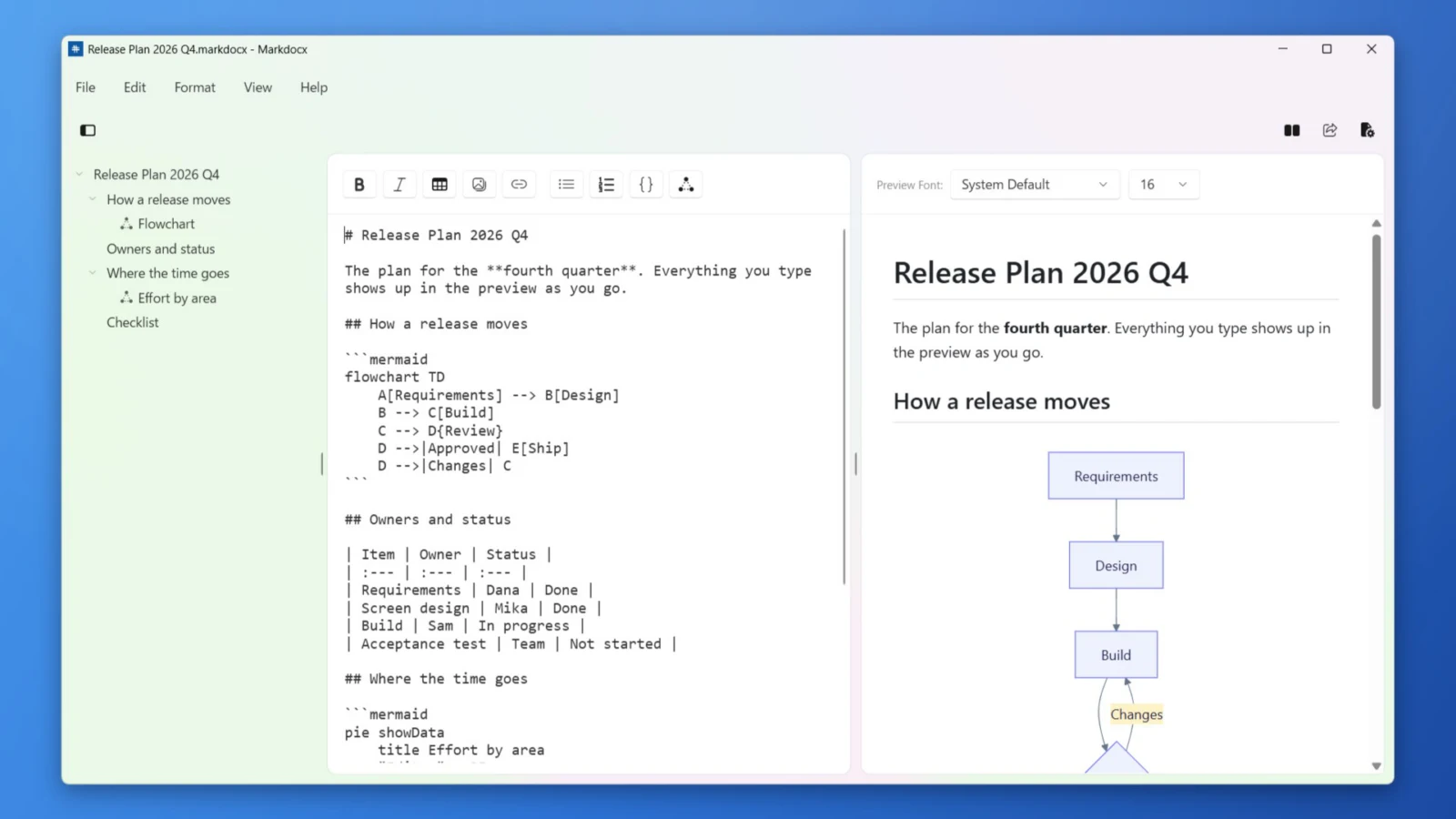
A live preview that keeps up with every keystroke, in three layouts: editor and preview side by side, or stacked either way. Two-way scroll sync keeps both panes on the same paragraph, and an outline of your headings and diagrams makes long documents easy to move around.
- Toolbar for bold, italic, links, images, tables, lists and task lists
- Lists continue and indent as you type
- Find bar, adjustable editor font size, per-document preferences
GitHub Flavored Markdown
Tables with column alignment, task lists, strikethrough, fenced code blocks with syntax highlighting, inline and block HTML, and automatic links — everything you already write, rendered the way you expect.
A proper Mac app
Opens plain .md files and keeps saving them as .md. Autosave and Versions keep your work on disk. Drag images straight into the editor. A single newline can be shown as a line break — chosen to match your language on first launch, and changeable at any time.

Now on Windows, too
Markdocx for Windows is available on the Microsoft Store. The live preview, Mermaid diagrams, the outline and export to Word, PDF, EPUB and HTML — the same idea as the Mac version, made for Windows. It follows the Windows light and dark theme, saves your work automatically and needs no account. Every feature is free for 14 days; export is then a one-time purchase (bought separately from the Mac version).
Markdocx — questions and answers
What happens after the 14-day trial?
Writing, live preview, Mermaid diagrams, colour palettes and the outline stay free with no time limit. Markdocx Premium — a one-time purchase — unlocks Word import and export to Markdown, HTML, PDF, Word and EPUB.
Do I need Pandoc or another converter?
No. Markdocx writes .docx and .epub files itself. There is nothing to install or configure.
Are diagrams rendered online?
No. Mermaid diagrams are drawn on your Mac or PC. No internet connection and no third-party service are involved.
Can I keep using my existing .md files?
Yes. Markdocx opens plain .md files and keeps saving them as .md. If you attach images, save in the Markdocx (.markdocx) format so the images travel with the document.
Does the purchase work on more than one Mac?
Yes. It is a one-time purchase that works on every Mac signed in with the same Apple Account. The Windows version is bought separately on the Microsoft Store.
Is there a Windows version?
Yes. Markdocx for Windows is on the Microsoft Store and runs on PCs with Windows 11 or Windows 10 (version 1809 or later), on both x64 and Arm64. Every feature is free for the first 14 days; after that, writing, preview and diagrams stay free, and export and Word import are a one-time purchase, bought separately from the Mac version.
How do I convert Markdown to Word on a Mac?
Open your Markdown in Markdocx and choose Export → Word (.docx). The conversion runs inside the app: no Pandoc, no command line, nothing uploaded.
Can it export PDF and EPUB as well?
Yes. The same document exports as PDF, EPUB or a standalone HTML page, with tables, code blocks and Mermaid diagrams intact.