
A .md file is a text file written in Markdown. Any text editor can open it, including TextEdit on a Mac and Notepad on Windows. A text editor, however, shows symbols such as “#” and “|” as they are, so to read headings and tables properly formatted, you need to open the file in an app that can show a Markdown preview.
If you make Markdocx, an app for Mac and Windows, the default app for .md files, you can open any .md file with a double-click. Set the Markdocx layout to preview only (preview mode), and headings, lists and tables appear as a clean document every time. Opening, reading and editing .md files in Markdocx is free.
This article compares the ways to open a .md file on Mac and Windows, then walks you step by step through setting up Markdocx so that a double-click opens .md files in a clean, formatted view.
What is a .md file?
A .md file (Markdown file) is a text file written in Markdown. Besides “.md”, the extension “.markdown” is sometimes used. Formatting is marked with symbols: “#” for headings, “**” for bold, “-” for bulleted lists and “|” for tables.
.md files are widely used for answers from AI chat apps, the output of AI agents, instruction files for AI agents (such as CLAUDE.md and AGENTS.md), README.md files on GitHub, technical documents and meeting notes.
The content of a .md file is just text, so any app can open it. How easy it is to read depends on whether the app shows the symbols as they are, or understands them and lays the text out (shows a preview).
Ways to open a .md file compared (Mac and Windows)
If you open a .md file in TextEdit on a Mac, the Markdown symbols appear as they are.
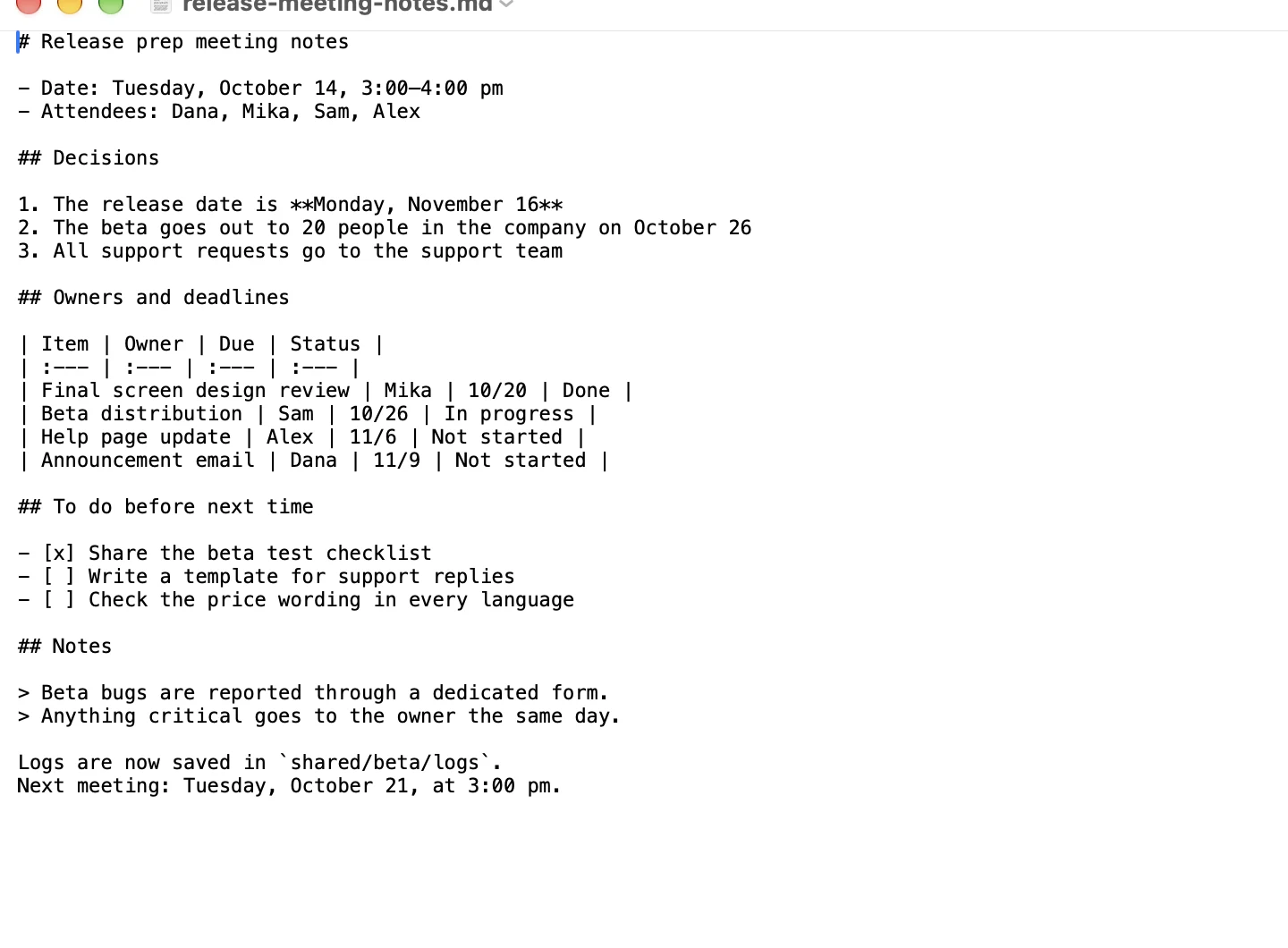
Here is how the main ways to open a .md file compare (as of November 2026).
| App | OS | How the .md file looks | Price | Best for |
|---|---|---|---|---|
| TextEdit | Mac | The symbols as they are | Free (comes with the Mac) | A quick look at the contents |
| Notepad | Windows 11 | The latest Notepad can show formatting | Free (comes with Windows) | Easy reading on Windows |
| VS Code | Mac, Windows, Linux | Formatted once you open the preview (⇧⌘V on Mac, Ctrl+Shift+V on Windows) | Free | People who write code |
| Chrome and other browsers | Mac, Windows | Plain text with the symbols | Free | — |
| Markdocx | Mac, Windows | A clean document (preview) with a double-click | Free to read and edit | Anyone who wants to read and edit .md files easily |
With VS Code and other developer editors, you have to open the app and then open the preview, and the screen is built around editing. If you just want to read the .md files you receive, an app like Markdocx that opens them as clean documents with a double-click is simpler.
How do you open .md files with a double-click?
Make Markdocx the app that opens when you double-click a .md file (the default app), and from then on any .md file opens in Markdocx with a double-click.
Set .md files to open in Markdocx on a Mac
- Select a .md file in the Finder and choose File > Get Info
- Under “Open with”, choose Markdocx
- Click “Change All…”, then click “Continue” to confirm
Set .md files to open in Markdocx on Windows
- Right-click a .md file and choose Open with > Choose another app
- Select Markdocx in the list and click “Always”
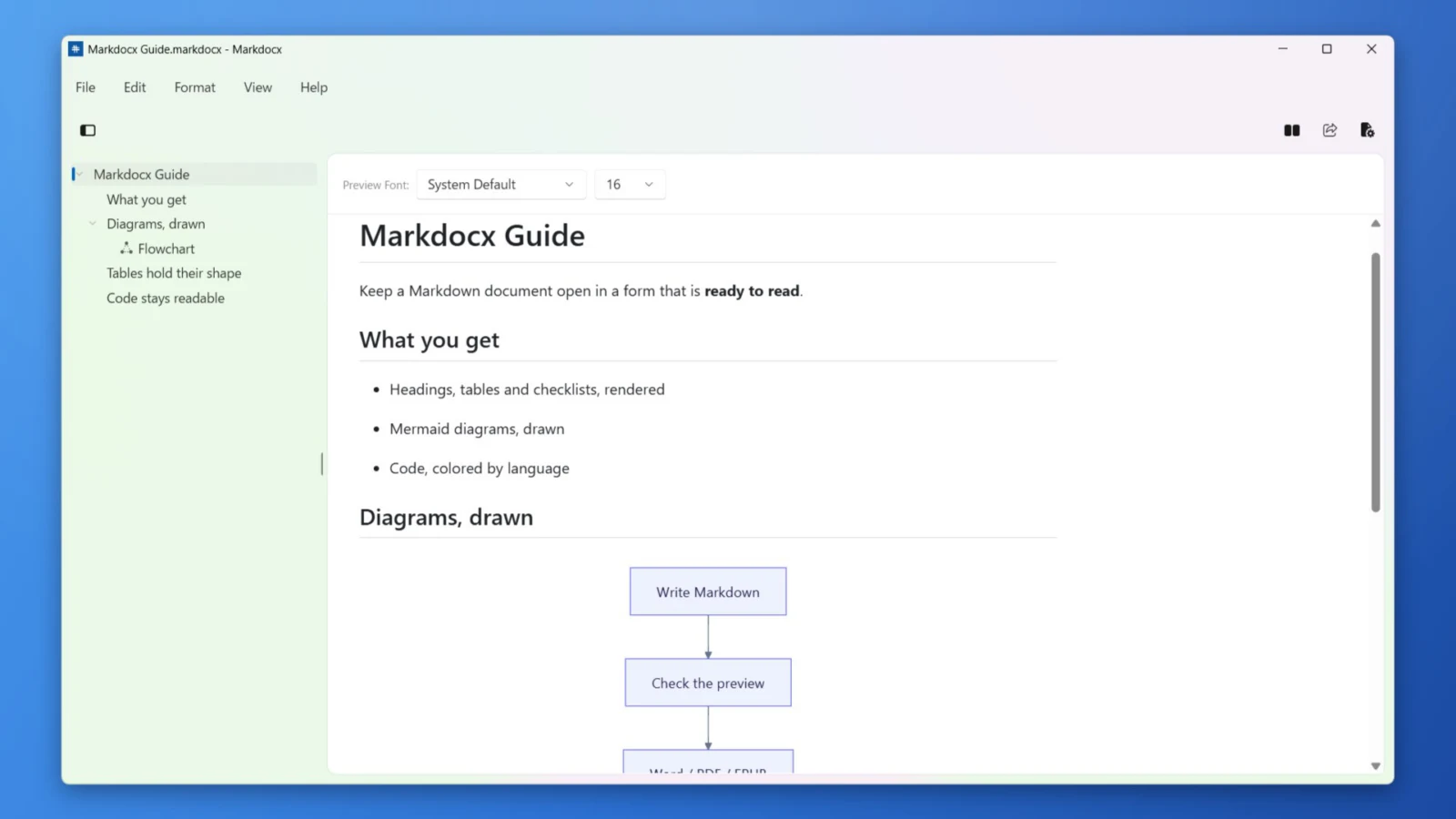
How do you read a .md file nicely formatted? Use preview only
Markdocx can show the “editor”, where you write Markdown, and the “preview”, which shows it formatted, side by side. If you mostly read .md files, we recommend setting the Markdocx layout to preview only (preview mode). On a Mac, click the Layout button at the top right of the window and choose the button on the far right.
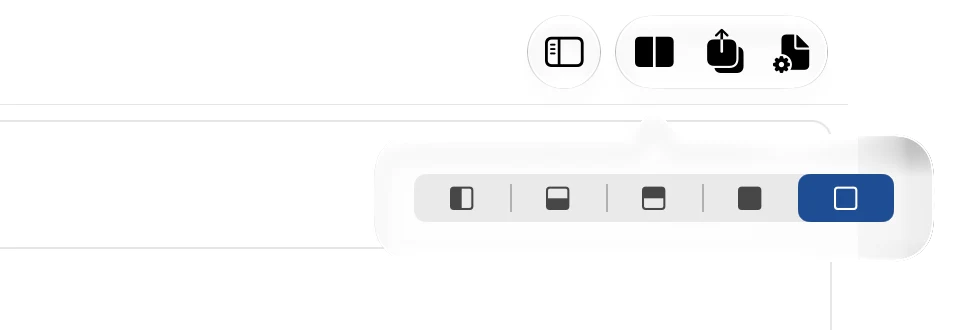
Markdocx remembers the layout you choose for .md files. Set it to preview only once, and from then on a double-click opens any .md file as a clean document right from the start.
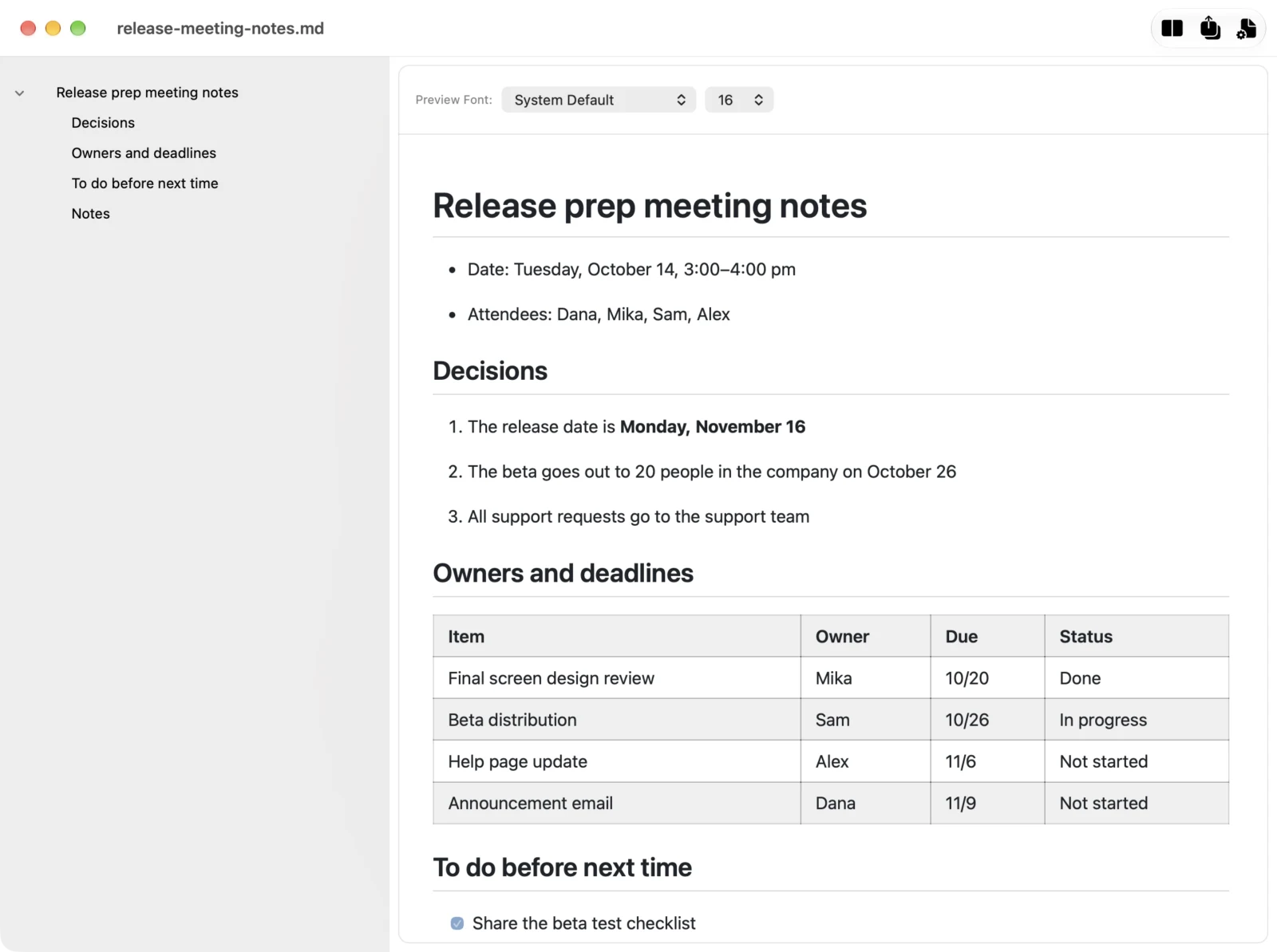
In the Markdocx preview, a .md file is shown like this:
- Headings, bulleted and numbered lists, tables, checklists, quotes and code blocks are laid out properly, with code colored by language
- Diagrams written in Mermaid are shown as diagrams
- Headings are listed in the outline on the left, so you can jump to any part of a long document
- Change the preview’s font and text size at the top of the preview
How do you edit a .md file in Markdocx?
If you spot something to fix while reading a .md file, use the Layout button in Markdocx to show the editor as well. The editor and the preview can sit side by side or one above the other.
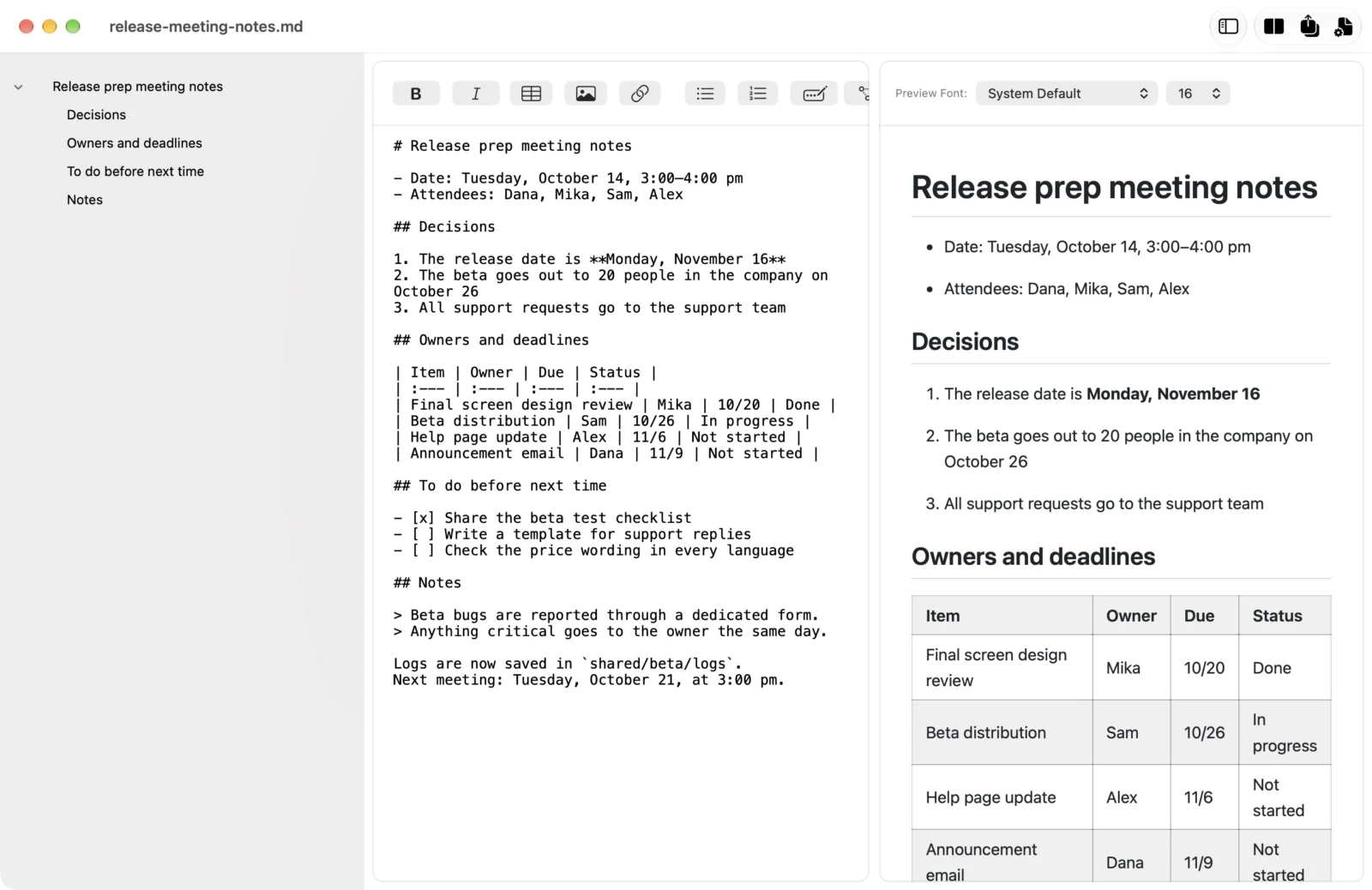
- What you type in the editor shows up in the preview right away, and scrolling stays in sync between the editor and the preview
- The formatting buttons insert bold, links, tables, images, lists and more — no need to remember every bit of Markdown syntax
- Your work is saved automatically. Markdocx saves a .md file as a .md file, so it still works on GitHub and in other apps
Markdocx pricing: reading and editing are free
Markdocx is available on the Mac App Store and the Microsoft Store. Every feature is free for the first 14 days. After that, opening, reading, previewing and editing .md files stay free with no time limit. No account is needed.
The only things that need a one-time purchase (Markdocx Premium) are export to Word, PDF, EPUB, HTML and other formats, and importing Word documents. It is not a subscription. Reading the instructions and output of AI agents in Markdocx is covered in “Read CLAUDE.md and your AI agent’s output with a double-click: Markdocx for people who use AI agents”.
Markdocx requirements
The Mac version of Markdocx runs on macOS 26 or later, and the Windows version on Windows 11 and Windows 10 (version 1809 or later). Markdocx is available in 33 languages.
Frequently asked questions
Can I open a .md file for free?
Yes. A .md file is a text file, so you can open it for free in apps that come with your computer, such as TextEdit on a Mac or Notepad on Windows. If you want to read headings and tables properly formatted, Markdocx also lets you open, read, preview and edit .md files for free.
Why does a .md file show lots of symbols when I double-click it?
Because the app that opens when you double-click a .md file (the default app) is a text editor such as TextEdit. A text editor shows Markdown symbols as they are. If you make an app that can preview Markdown, such as Markdocx, the default app, the file appears as a clean document.
What is the difference between .md and .markdown?
Both are text files written in Markdown, and the content is written the same way. Only the extension differs, and .md is more widely used. Markdocx can open both .md and .markdown files.
Does editing a .md file in Markdocx change its format?
No. Markdocx saves a .md file as a .md file, so you can keep using it on GitHub and in other Markdown apps.
How do I convert a .md file to Word or PDF?
Markdocx can export a .md file to Word (.docx), PDF, EPUB and HTML. Export is a feature that needs a one-time purchase (Markdocx Premium). Adding Mermaid diagrams and exporting to Word is covered in “For anyone writing technical documents in Markdown: draw diagrams with Mermaid and export straight to Word with Markdocx”.
Summary: how to open a .md file
- A .md file is a text file written in Markdown. TextEdit (Mac) and Notepad (Windows) can open it, but the symbols make it hard to read
- Make Markdocx (Mac and Windows) the default app for .md files, and a double-click is all it takes to open them
- Set the Markdocx layout to preview only, and you read a clean document every time. When you want to fix something, you can edit it right there