Start using an AI agent like Claude Code or Codex and your computer suddenly fills up with “.md” files: CLAUDE.md, where you write instructions for the agent, and the research results and work plans the agent writes for you. They are all text files written in a format called Markdown.
But double-click a .md file and it often won’t open in a readable way. This article introduces Markdocx, a Mac and Windows app for reading and editing .md files, to people who use AI agents.
AI agents work in .md files
When you work with an AI agent, .md files serve two purposes: instructions and output.
Instructions for the agent
Claude Code reads CLAUDE.md every time it starts working. Write down your workflow, the rules you want it to follow and how you like things written, and you won’t have to explain them every time.
| File | Read by | Purpose |
|---|---|---|
| CLAUDE.md in the project folder | Claude Code | Instructions for that project. The /init command can create a first version |
| ~/.claude/CLAUDE.md | Claude Code | Your own preferences, for every project |
| AGENTS.md | Codex (Claude Code can read it too) | Instructions for the project |
~/.claude is a hidden folder inside your home folder. In the Finder on a Mac, press Command + Shift + . (period) to show hidden folders.
Instructions aren’t something you write once and forget. You reread them as you watch how the agent works, add to them and let them grow.
Output from the agent
Research reports, work plans, summaries of changes, READMEs: the results of the work you hand to an agent often arrive as .md files too. Markdown marks headings, lists and tables with symbols, so it is easy for an AI to write and its structure is easy for people to follow. When an agent explains a process or how something is put together, it often adds a diagram written in a format called Mermaid.
But .md files are hard to read
A .md file is text in which headings are marked with “#”, bold with “**” and tables with “|”. Surprisingly few apps will tidy this up for you when you double-click it.
- On a Mac, it opens in an app like TextEdit with the symbols still showing, or a developer’s app opens instead
- Notepad in Windows 11 can now show simple formatting such as headings, bold and lists. But tables, code coloring and Mermaid diagrams, which are common in an agent’s output, are not part of what it shows
To read them properly, you have to paste them into a web service or open a preview in a developer’s editor: one extra step. Doing that every time the agent hands you a report quickly gets tiring. And when you edit CLAUDE.md, you end up rewriting text full of symbols.
Markdocx: read with a double-click, edit right there
Markdocx is a Mac and Windows app that shows a .md file as a clean document the moment you open it. Make Markdocx the app for .md files, and from then on a double-click is all it takes. The steps are in our article on an app for opening .md files.
Read your agent’s output as a clean document
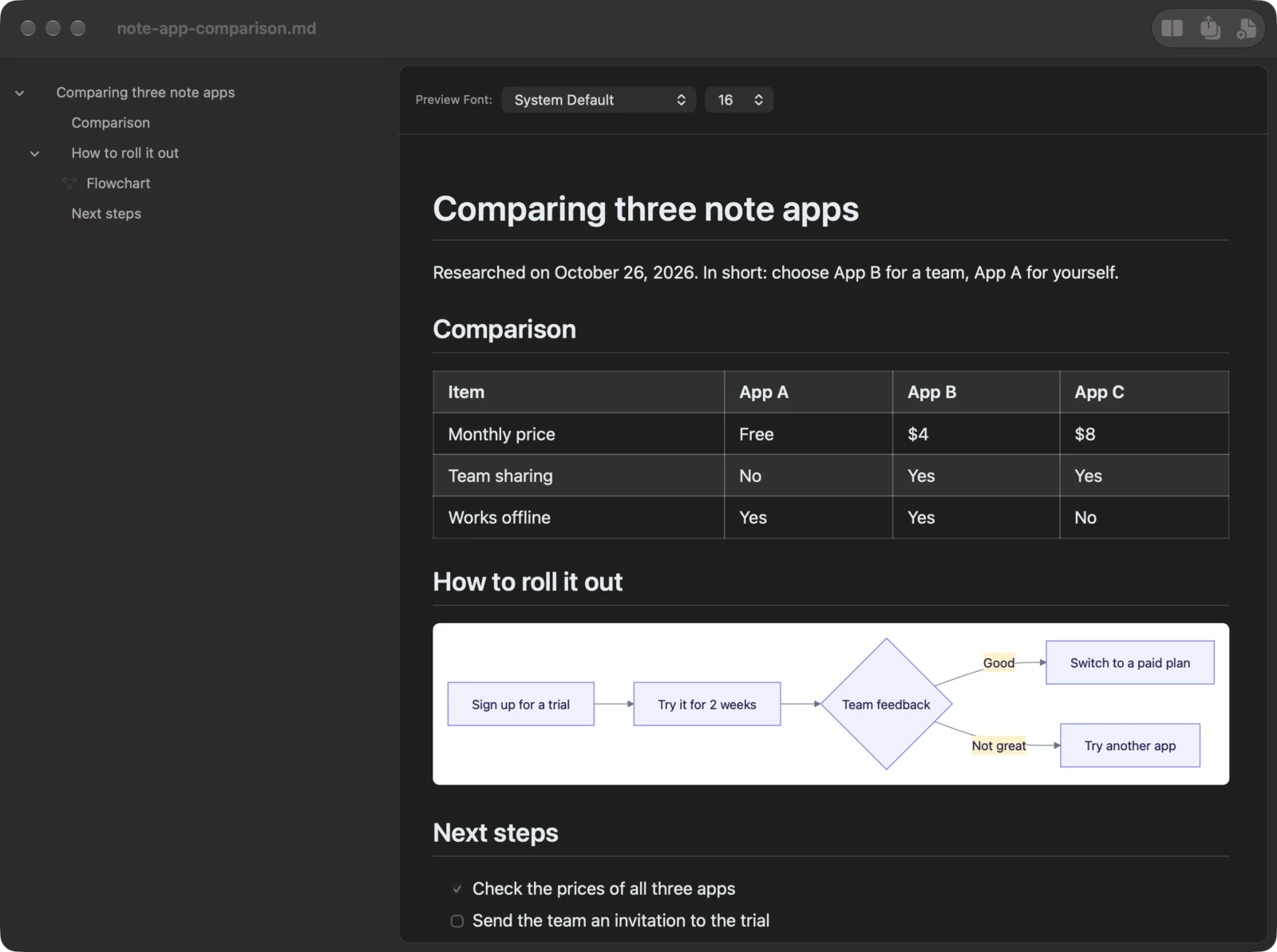
- Headings, lists, tables, checklists and quotes are laid out properly, with code colored by language
- Mermaid diagrams appear as diagrams. Ten kinds are supported, from flowcharts to sequence diagrams, and they are drawn on your computer, so you can see them without an internet connection
- Headings are listed in the outline on the left, so you can jump to any part of a long report
Edit CLAUDE.md while you watch the preview
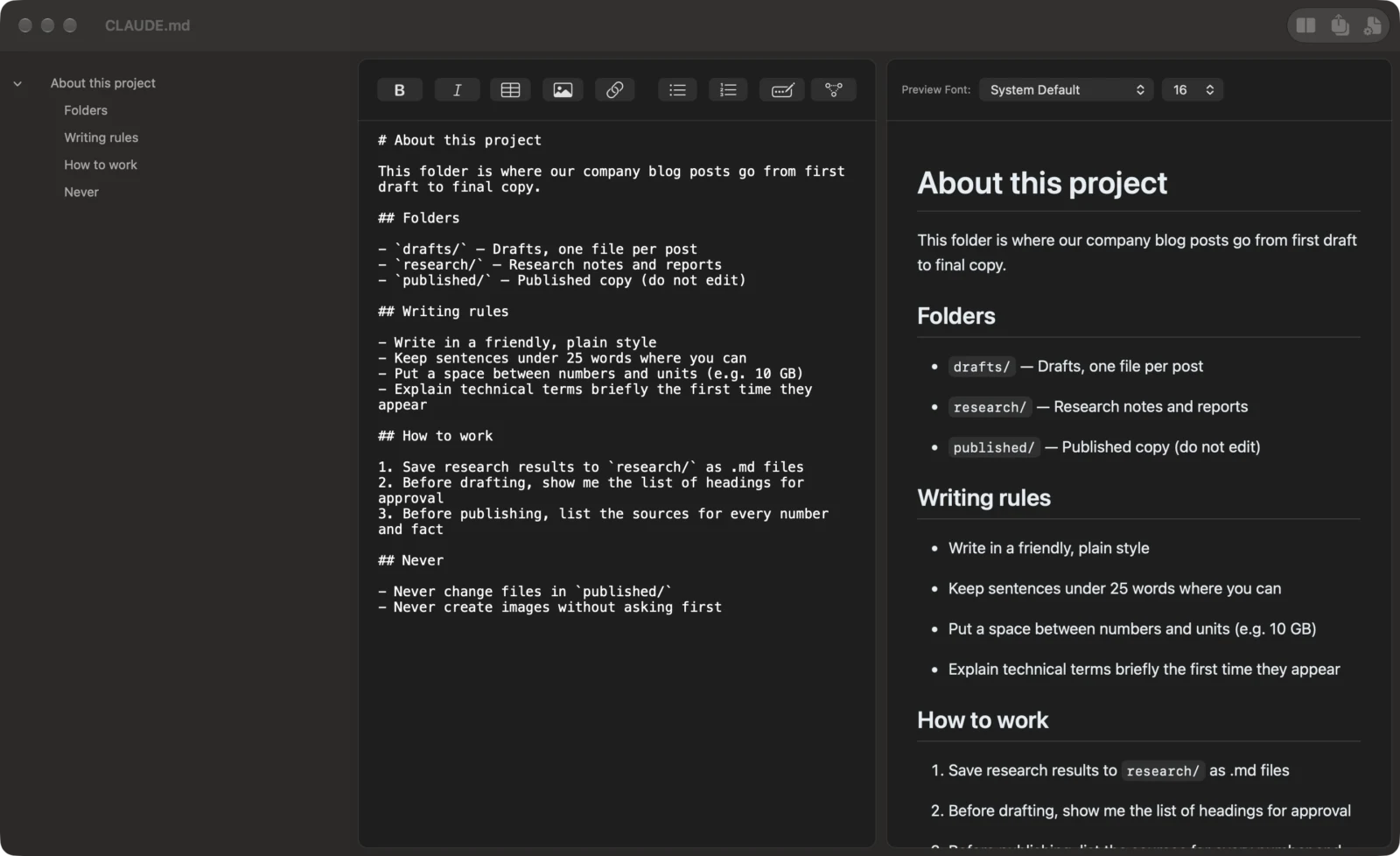
- Put the editor and the preview side by side. What you type shows up in the preview right away, so you can check how your instructions are organized under each heading as you add to them
- The formatting toolbar inserts bold, links, tables, lists and more, so there is no need to remember every bit of Markdown syntax
- Your work is saved automatically, and a .md file stays a .md file. The agent reads your edited CLAUDE.md or AGENTS.md the next time it starts working
Hand off the output as Word or PDF
Sometimes you want to pass a report from your agent to coworkers or clients who don’t use AI. With Markdocx, export it to Word (.docx) or PDF from the export button in the toolbar. Headings, tables and code carry over, and Mermaid diagrams go in as images, so the people you send it to can see the diagrams with nothing but Word. Find out more in our article on Mermaid and export to Word.
Reading and editing stay free
Markdocx is available on the Mac App Store and the Microsoft Store. Every feature is free for the first 14 days. After that, opening, reading and editing .md files stay free with no time limit. No account is needed. Export to Word, PDF and other formats is unlocked with a one-time purchase. There is no subscription.
The Mac version runs on macOS 26 or later, and the Windows version on Windows 11 and Windows 10 (version 1809 or later).