Alarms in the iPhone’s built-in Clock app ring even when a Focus is on. That goes for Do Not Disturb, the Sleep Focus and other Focus options such as Work or Personal, and for Silent mode too. For other apps, it depends on how the app makes its alarm sound. Apps that use AlarmKit, introduced in iOS 26, ring just like the Clock app, while apps that sound alarms through iOS notifications may not alert you while a Focus is on.
This article sums up in a table whether alarms ring in Focus, Do Not Disturb, Sleep and Silent mode, then explains how to let a notification-based alarm app through during a Focus and what sets the alarm volume. Everything here was checked against Apple Support and Apple developer documentation, and applies to iOS 26 and iOS 27. If your alarm doesn’t go off in Silent mode, see “iPhone alarm not going off in Silent mode? Here’s what to check”.
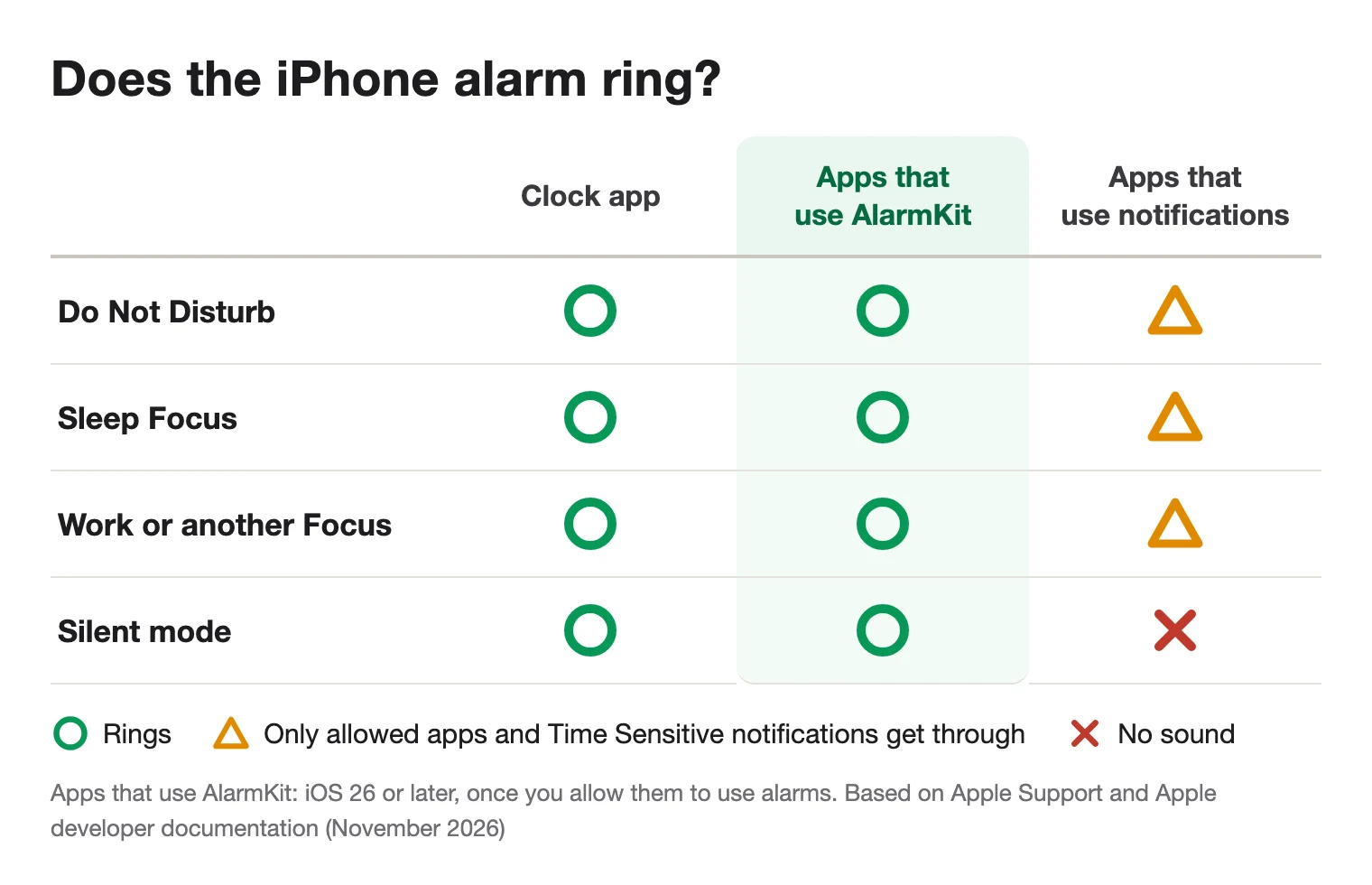
Do iPhone alarms ring in Focus, Do Not Disturb, Sleep and Silent mode?
Here’s whether alarms ring in each state, for the Clock app, apps that use AlarmKit and apps that use notifications.
| iPhone state | Clock app | Apps that use AlarmKit (iOS 26 or later) | Apps that use notifications |
|---|---|---|---|
| Do Not Disturb | Rings | Rings | May not alert you (allowed apps and Time Sensitive notifications* get through) |
| Sleep Focus | Rings | Rings | May not alert you (allowed apps and Time Sensitive notifications* get through) |
| Other Focus options (Work, Personal and so on) | Rings | Rings | Depends on that Focus’s settings (allowed apps and Time Sensitive notifications* get through) |
| Silent mode | Rings | Rings | No sound (iPhone may still vibrate) |
| Both a Focus and Silent mode | Rings | Rings | No sound, even if the notification is delivered |
| App not allowed to use alarms or send notifications | – | Alarms can’t be scheduled and don’t ring | Notifications aren’t delivered |
| Volume | Plays at the Ringtone and Alerts volume in iOS 26, and at the Alarms and Timers volume in iOS 27 | Not covered in Apple’s documentation | Not covered in Apple’s documentation |
* Time Sensitive notifications get through when the app supports them and Time Sensitive Notifications is turned on both in the Focus and for the app. Some notifications that only apps with special permission from Apple can send are an exception: they play a sound even in Silent mode and with Do Not Disturb on.
The Clock app’s alarms ring during a Focus and in Silent mode
Apple says that alarms in the Clock app still sound when you:
- Turn on Silent mode
- Turn on Do Not Disturb (or another Focus)
- Connect headphones. The alarm plays at a set volume through both the built-in speakers on your iPhone and your headphones
Focus is a feature that reduces distractions by temporarily silencing notifications and calls. Even if you go to sleep with Do Not Disturb or the Sleep Focus on, the Clock app’s alarms still ring.
How does the Sleep Focus relate to the sleep schedule’s wake up alarm?
If you set up a sleep schedule in the Health app and set up a Sleep Focus, the Sleep Focus turns on automatically. It starts at the beginning of your wind down time and turns off again at your next wake up time.
- You can change the sleep schedule’s wake up alarm from Alarms in the Clock app. Its sound, alarm volume and snooze are set for this alarm only
- Alarms you create in the Clock app are unrelated to your sleep schedule and don’t turn on the Sleep Focus
- If you don’t want the Sleep Focus to turn on automatically, turn off Use Schedule for Sleep Focus in the Sleep settings in the Health app. Your sleep schedules and wake up alarms stay in effect
Sleep is a Focus too, so alarms you create in the Clock app ring while the Sleep Focus is on.
Why do notification-based alarm apps sometimes stay silent during a Focus?
Some alarm apps sound their alarms through iOS notifications. Notifications follow your Focus and Silent mode settings.
- During a Focus, notifications from apps that aren’t allowed in that Focus don’t alert you (their delivery is delayed)
- In Silent mode, notifications make no sound
- Notification sounds must be shorter than 30 seconds
How to let notifications through during a Focus
- Open the Settings app, then tap Focus
- Choose the Focus that’s on when your alarm goes off, such as Do Not Disturb or Sleep
- Tap Apps, then add the alarm app under Allow Notifications From. If the Focus uses Silence Notifications From, make sure the alarm app isn’t on that list
On the same screen, you can turn on Time Sensitive Notifications to let all apps send time-sensitive notifications immediately. If the alarm app supports them, also turn on Time Sensitive Notifications for that app in Settings > Notifications.
Even so, what gets through is a notification. If Silent mode is on, it makes no sound even when it’s delivered. To wake up to sound during a Focus and in Silent mode alike, use the Clock app or an app that uses AlarmKit.
Apps that use AlarmKit ring during a Focus and in Silent mode
AlarmKit is the framework Apple introduced in iOS 26 that lets apps create alarms and timers. According to Apple, when an AlarmKit alarm goes off, it breaks through Silent mode and the current Focus. It also appears in StandBy and on a paired Apple Watch.
- Each app needs your permission first. If you don’t allow it, the app’s alarms aren’t scheduled and don’t ring
- You can change this permission later in the Settings app
- AlarmKit requires iOS 26 or later. To find out whether an app uses AlarmKit, check its App Store description, for example
For more on how the Clock app, notification-based apps and AlarmKit apps differ, see “Do iPhone alarms ring in Silent mode and Focus? The Clock app, notification-based alarm apps and Alarmo compared”.
What sets the volume of the Clock app’s alarms?
Even if an alarm rings during a Focus, you may not notice it when the volume is low. The volume of the Clock app’s alarms is set here:
- iOS 27: Settings > Sounds & Haptics > Alarms and Timers. Match Ringtone Volume is on by default; turn it off to give alarms and timers their own volume
- iOS 26: the slider under Ringtone and Alerts in Settings > Sounds & Haptics
- With Change with Buttons on, the volume buttons also change the alarm volume
- For the sleep schedule’s wake up alarm, use the Alarm volume slider under Alarm Options
Apple’s documentation doesn’t say which volume setting alarms from AlarmKit apps or notification-based apps follow.
Alarmo: an AlarmKit alarm app that rings during a Focus and in Silent mode
Alarmo is an alarm and timer app for iPhone that sounds its alarms with AlarmKit. Like the Clock app’s alarms, it rings during a Focus and in Silent mode. The first time you set an alarm, iOS asks whether to allow Alarmo to use alarms. Choose “Allow”.
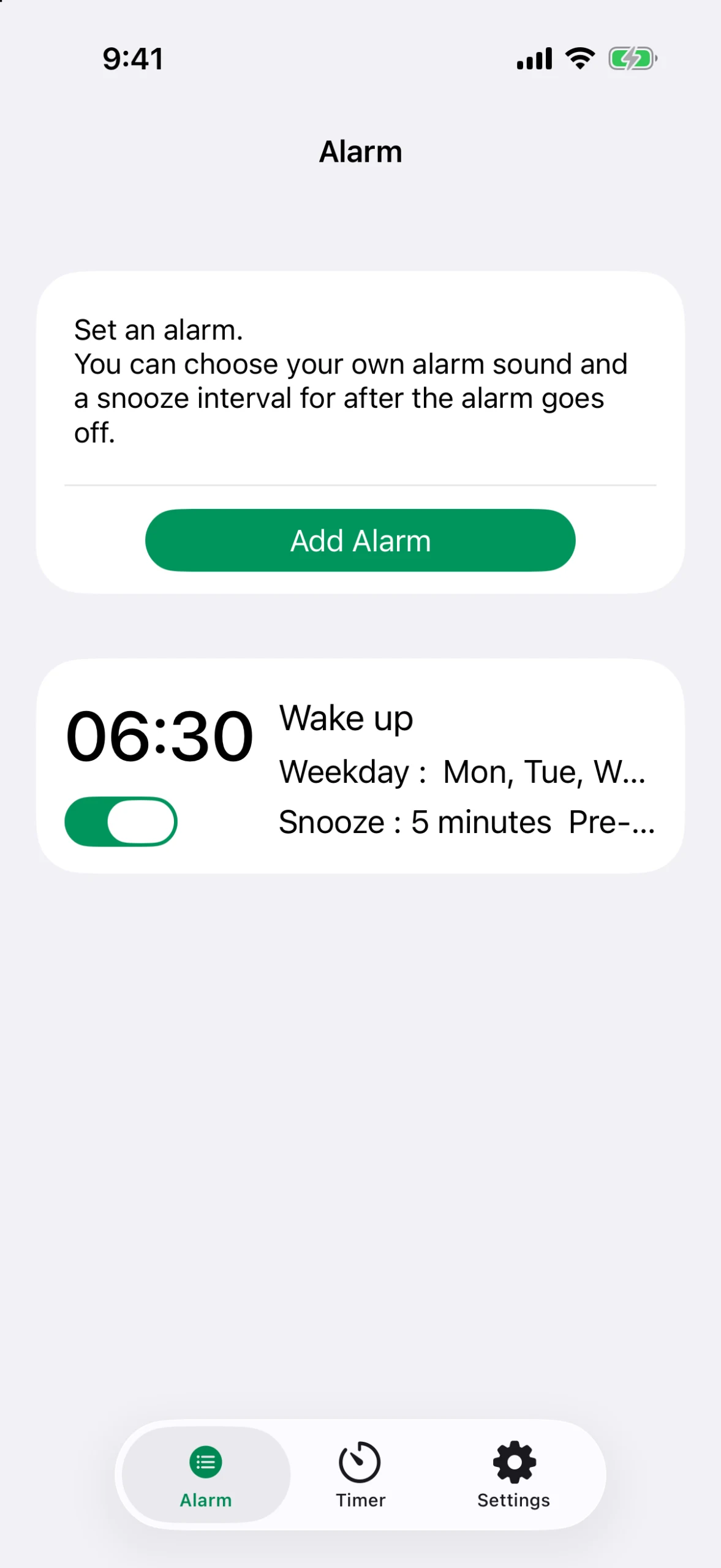
- Pre-Alert: alerts you 1 to 30 minutes before the alarm, in 1-minute steps. The Pre-Alert is an AlarmKit alarm too, so it also rings during a Focus and in Silent mode
- Snooze: choose an interval from 1 to 30 minutes, in 1-minute steps
- Wake up to the sound you like: besides 9 built-in sounds, you can use an mp3 or wav file from the Files app as your alarm sound
- One-time alarms: pick a date and the alarm rings just once. After it rings, it turns itself off
Alarmo works on iPhone with iOS 26 or later. It’s free for one alarm, and buying Alarmo Premium (a one-time purchase) removes the limit on the number of alarms. There’s no subscription. For how to set it up, see “An iPhone alarm app that rings even in Silent mode: Alarmo”.
Frequently asked questions
Do alarms in the iPhone’s Clock app ring during a Focus?
Yes. Alarms in the iPhone’s built-in Clock app ring even when Do Not Disturb or another Focus is on. Apple says they also ring in Silent mode.
Will my iPhone alarm go off if I fall asleep with Do Not Disturb on?
Alarms from the Clock app and from apps that use AlarmKit will. An alarm app that uses notifications may not alert you if its notifications aren’t allowed in Do Not Disturb.
Do iPhone alarms ring while the Sleep Focus is on?
Yes. Sleep is a Focus too, so the Clock app’s alarms ring. You can also change the sleep schedule’s wake up alarm from the Clock app, and the Sleep Focus turns off again at your wake up time.
Why doesn’t my alarm app ring during a Focus?
Most likely because the app sounds its alarms through iOS notifications. During a Focus, notifications from apps that aren’t allowed don’t alert you, and in Silent mode notifications make no sound.
Can I let a notification-based alarm app through during a Focus?
Yes. In Settings > Focus, choose the Focus you use, tap Apps, and add the app under Allow Notifications From, or turn on Time Sensitive Notifications. But if Silent mode is on, the notification makes no sound even when it’s delivered.
Is there an alarm app that rings during a Focus and in Silent mode?
Yes. Alarms from apps that use AlarmKit, which Apple introduced in iOS 26, break through Silent mode and Focus when they go off. Alarmo is one of those apps. It works on iPhone with iOS 26 or later and is free for one alarm.
Summary
- The Clock app’s alarms ring with Do Not Disturb, Sleep or any other Focus on, and in Silent mode
- Apps that use AlarmKit (iOS 26 or later) also break through Focus and Silent mode, once you allow them to use alarms
- Apps that use notifications may not alert you during a Focus, and make no sound in Silent mode
- To let a notification-based app through during a Focus, use Allow Notifications From or Time Sensitive Notifications. To be sure you wake up to sound, use the Clock app or an AlarmKit app
- The Clock app’s alarm volume is set under Ringtone and Alerts in iOS 26, and under Alarms and Timers in iOS 27