A .md file (Markdown) is a text file in which headings and tables are written with symbols such as “#” and “|”. To use it in Word as a document with proper headings, lists and tables, convert the .md file to a Word document (.docx) first and then open it. On Windows, there are four ways to convert it: copy and paste, Pandoc, an online converter and Markdocx. If you want to convert quickly, Mermaid diagrams included, without sending confidential documents outside your PC, Markdocx, which creates the Word document on your PC, is a good fit.
This article explains what happens when you open a .md file in Word, the Markdown support for Word that Microsoft announced in October 2026, how the four methods differ and how to do it in Markdocx. For the Mac, see “3 ways to convert Markdown to Word (.docx) on Mac”. For opening .md files in general, see “How do you open a .md file?”.
| Item | Details |
|---|---|
| What a .md file is | A text file written in Markdown. Formatting is written with symbols: “#” for headings, “**” for bold, “|” for tables |
| To get a proper Word document | Convert the .md file to a Word document (.docx), then open it |
| Markdown support in Word (announced October 2026) | Markdown shortcuts while typing, copy and paste with Markdown that keeps formatting, and conversion between .md and .docx in Word for the web |
| Ways to make a .docx on Windows | Copy and paste, Pandoc, an online converter, Markdocx |
| Suited to confidential documents | Pandoc or Markdocx, which convert on your PC |
| Markdocx system requirements (as of November 2026) | Windows 11, Windows 10 (version 1809 or later). A Mac version (macOS 26 or later) is also available |
| Markdocx price (as of November 2026) | All features free for the first 14 days. After that, opening, reading and editing .md files stays free; exporting to Word is a one-time purchase |
What happens when you open a .md file in Word?
.md files are widely used for AI chat answers, the output of AI agents and README.md files on GitHub. The content is plain text: formatting is written with symbols, “#” for headings, “**” for bold and “|” for tables. Unlike a Word document (.docx), a .md file has no heading styles or table borders of its own.
So if you open a .md file in Word as text, symbols such as “#” and “|” appear exactly as typed, and you don’t get headings or tables. Also, as Microsoft’s support page explains, changing the file extension from .md to .docx doesn’t change the file’s format. To use it as a Word document, you need to convert the content of the .md file to Word’s format.
Does Word support Markdown now? (Microsoft’s October 2026 announcement)
On October 30, 2026, Microsoft announced Markdown support in Word on the Microsoft Copilot Blog. The announcement lists three features and says they rolled out in October:
- Markdown shortcuts to format text while you write
- Copy and paste between Word and Markdown while keeping the formatting
- Conversion between .md and .docx files in Word for the web (Word in the browser)
The announcement describes the conversion between .md and .docx as a Word for the web feature and doesn’t mention what happens when you open a .md file in the desktop version of Word on Windows. As of November 2026, we also couldn’t find a Microsoft support page explaining how to use it. To use a .md file from your PC in desktop Word, the reliable way is to convert it to .docx with one of the four methods below and then open it.
4 ways to turn a .md file into a Word document (.docx) on Windows, compared
Here’s how the four methods compare on effort, how the result looks in Word, whether confidential documents leave your PC, and cost (as of November 2026).
| Method | Effort | Result in Word | Confidential documents | Cost |
|---|---|---|---|---|
| Copy and paste | Paste by hand for each document, and again every time the .md file changes | Depends on the app you copy from and on Word | Stay on your PC if you paste between apps on your PC | Free |
| Pandoc | Install it and run a command | Headings, tables and lists become Word formatting. Styles can be set with a reference .docx | Converted on your PC | Free (open source) |
| Online converter | Just pick the file in your browser | Varies by service | The document goes to an outside website | Some are free |
| Markdocx | Open the file and export to “Word (.docx)” | Headings, lists and tables become Word formatting; Mermaid diagrams go in as images | Converted on your PC | Free for 14 days; after that, exporting is a one-time purchase |
Copy and paste: for a short document you need in Word just once
Select the text in an app that displays Markdown formatted, copy it and paste it into Word. In its October 2026 announcement, Microsoft says the formatting is kept when you copy and paste between Word and Markdown.
It’s quick, but it’s manual work for each document, and you have to paste again every time the .md file changes. For long documents or documents with many tables, check the formatting in Word after pasting.
Pandoc: if you’re comfortable with commands and repeat the same conversion
Pandoc is a free, open-source tool that converts documents between formats. On Windows, you can install it with the installer (.msi) from the official website or with winget. You convert with a command, and the output format is decided by the extension of the output file (.docx).
winget install --source winget --exact --id JohnMacFarlane.Pandoc
pandoc document.md -o document.docx
To match your company’s formatting, such as the fonts for headings and body text, specify a reference Word document with --reference-doc. Pandoc’s manual doesn’t describe a feature for drawing Mermaid diagrams. If you want Mermaid diagrams in Word, you need to set up a separate way to create them, such as a filter.
Online converters: for documents that can be made public
Some services let you pick a .md file or paste the text in your browser and download a .docx. There’s nothing to install, but you hand the document to that service’s website. For confidential material or documents with personal information, check your company’s rules on whether you may put them into outside services.
Markdocx: to turn confidential documents into Word quickly
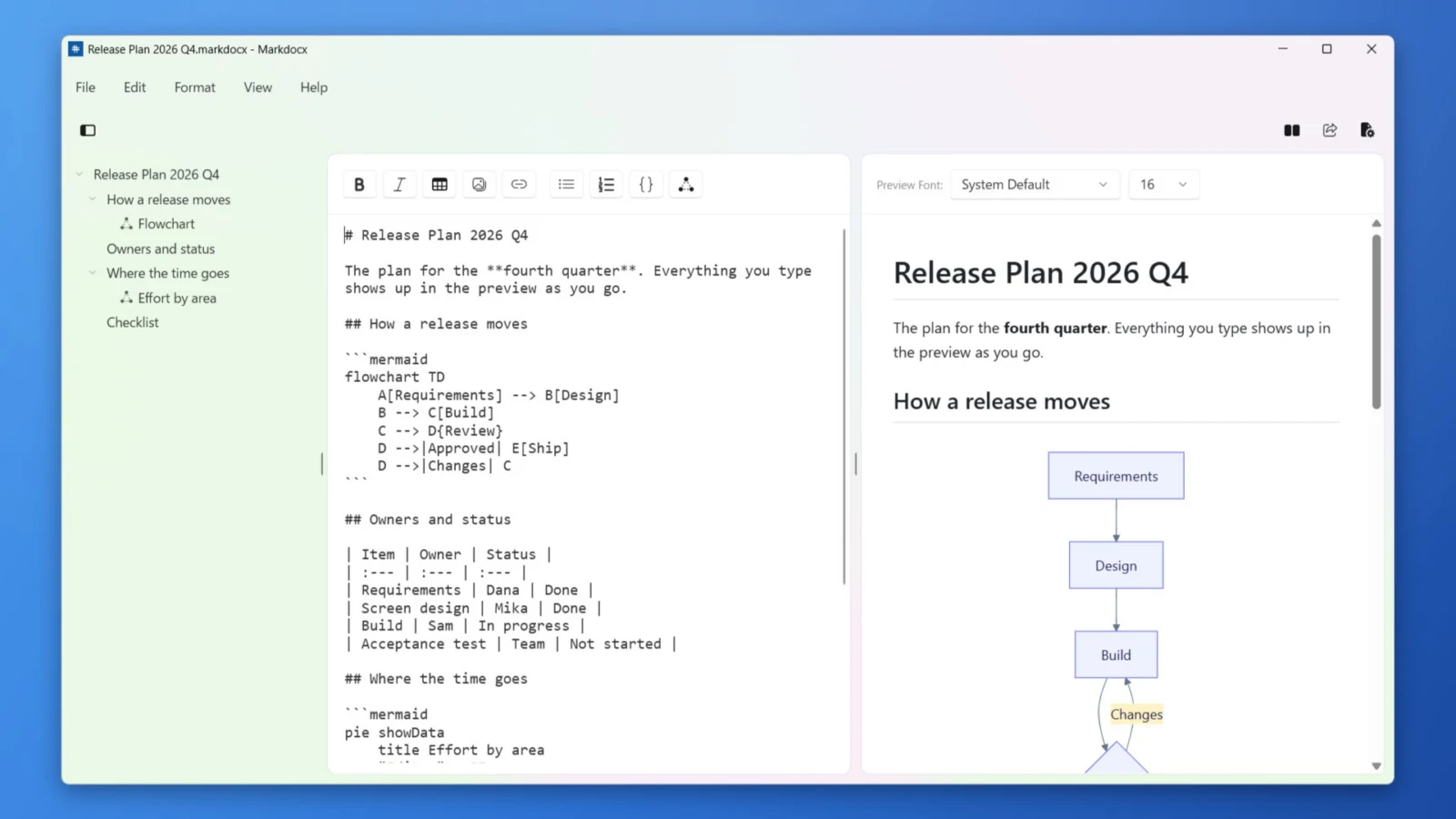
Markdocx is a Windows and Mac app that opens .md files so you can read them, edit them and export them to Word (.docx). Markdocx creates the Word document itself, so you don’t need to install Pandoc or type commands. Both the conversion and the drawing of Mermaid diagrams happen on your PC, and your document isn’t sent over the internet for them.
How do you turn confidential documents into Word without sending them out?
When you turn a confidential spec or meeting notes into Word, what matters is where the document goes for the conversion. Online converters hand it to an outside website. Pandoc and Markdocx convert it entirely on your PC.
- Markdocx creates the Word document on your PC. It doesn’t use outside conversion services or servers
- Mermaid diagrams are also drawn on your PC by the engine built into the app, so diagram content isn’t sent to an outside service either
- No account sign-up is needed
- The exported .docx is an ordinary Word document, so you can hand it straight to people who use Word
How to turn a .md file into a Word document with Markdocx (Windows)
- Install Markdocx from the Microsoft Store
- Open the .md file with “Open…” in Markdocx’s “File” menu. You can also right-click the .md file in File Explorer and choose Markdocx under “Open with”
- Check how the headings, tables and diagrams look in the preview on the right. You can fix anything directly in the editor on the left
- Choose “Word (.docx)” from the export button (“Export…”) at the top right of the window or from “Export…” in the “File” menu, then choose where to save it
- Open the exported .docx file in Word
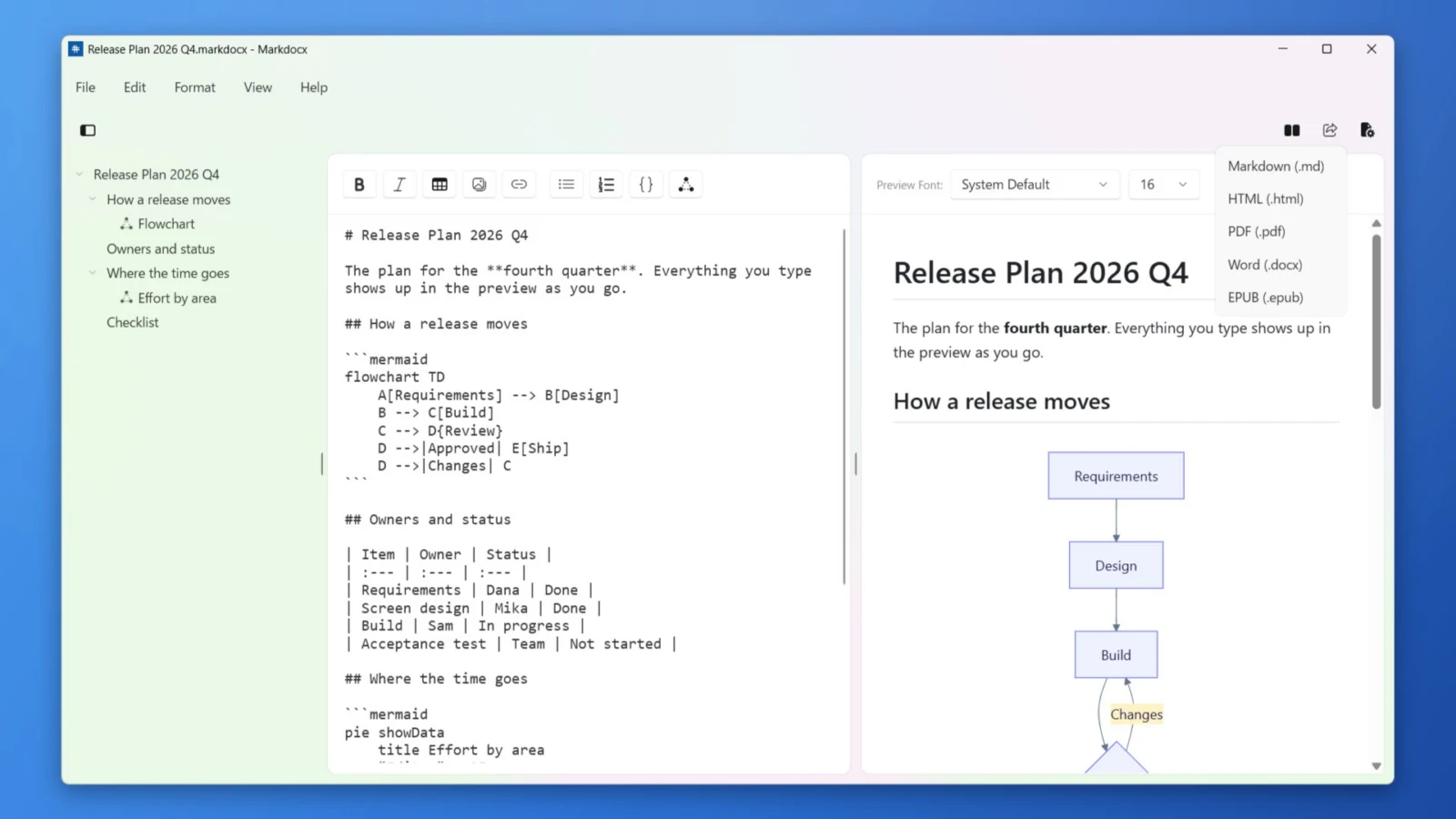
If you want .md files to open in Markdocx with a double-click every time, make it the default app. The steps are in “How do you open a .md file?”.
What goes into the Word document that Markdocx exports?
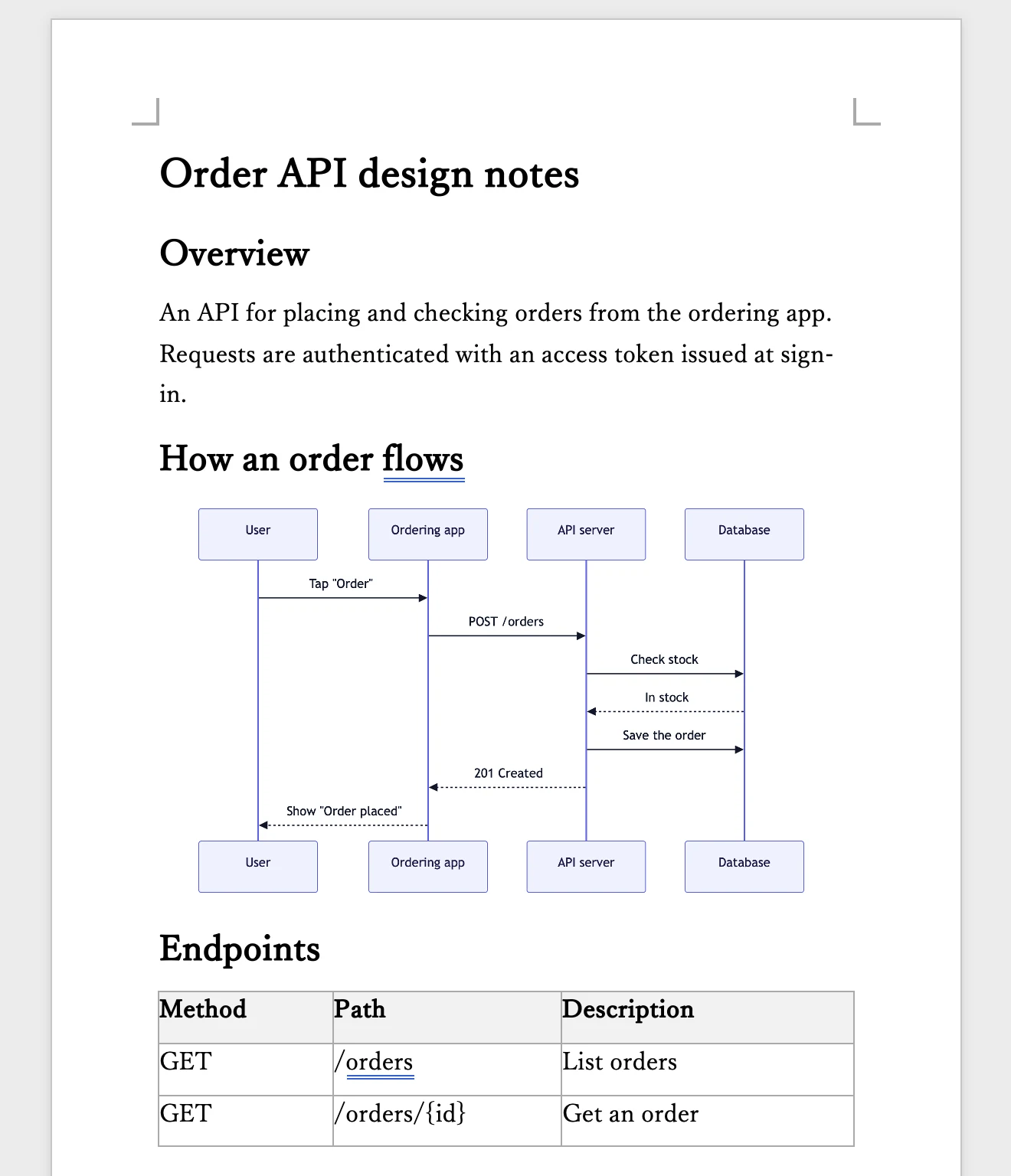
- Headings become Word heading styles (Heading 1 to Heading 6), so you can also use them for a table of contents in Word
- Bulleted and numbered lists become Word lists
- Tables become Word tables. When a table runs across pages, its header row appears on the next page too
- Code blocks go in with a monospaced font
- Mermaid diagrams go in as images, so recipients can see the diagrams with Word alone
- The body font and size follow the font and size of the Markdocx preview
How to write Mermaid diagrams is covered in “Draw diagrams with Mermaid and export straight to Word with Markdocx”. To go the other way and turn a Word document into Markdown, see “Turn Word documents into Markdown for AI”.
How much does Markdocx cost, and what does it run on?
The Windows version of Markdocx is available from the Microsoft Store. All features are free for the first 14 days, and after that, opening, reading, editing and previewing .md files and Mermaid diagrams stay free with no time limit. Exporting to Word and other formats, and importing Word files, are unlocked with a one-time purchase. It isn’t a subscription, and it’s a separate purchase from the Mac version. It runs on Windows 11 and Windows 10 (version 1809 or later) PCs (x64 and Arm64). The Mac version (macOS 26 or later) is available from the Mac App Store.
Frequently asked questions
Can you open a .md file in Word?
To use it as a Word document with proper headings and tables, convert the .md file to Word’s format (.docx) first and then open it. A .md file is a text file that writes formatting with Markdown symbols, so if you open it as text, the “#” and “|” symbols appear as they are. On Windows, Markdocx or Pandoc can convert it to .docx on your PC.
Can you open a .md file in Word by changing its extension to .docx?
No. As Microsoft’s support page explains, changing a file’s extension doesn’t convert it to another format. The content of a .md file stays text, so you need to convert it to .docx.
Does Word support Markdown?
In October 2026, Microsoft announced Markdown support in Word: Markdown shortcuts while typing, copy and paste with Markdown that keeps formatting, and conversion between .md and .docx in Word for the web. The announcement doesn’t mention what happens when you open a .md file in the desktop version of Word.
What’s the best way to convert Markdown to Word on Windows?
To convert quickly without sending confidential documents outside your PC, Markdocx is a good fit. If you’re comfortable with commands and repeat the same conversion, Pandoc works well. Online converters are easy, but you hand the document to an outside website.
Can Markdocx convert to Word without sending the document anywhere?
Yes. Markdocx creates the Word document and the Mermaid diagrams on your PC. It doesn’t send the document to outside services or servers for the conversion.
Is exporting to Word in Markdocx free?
All features, including exporting to Word, are free for the first 14 days. After that, exporting requires a one-time purchase. Opening, reading and editing .md files stays free with no time limit.
Do Mermaid diagrams make it into Word?
When you export to Word with Markdocx, Mermaid diagrams go into the Word document as images. Recipients can see the diagrams with Word alone.
Summary
- A .md file is a text file. To get a Word document with proper headings and tables, convert it to .docx
- Microsoft announced Markdown support in Word in October 2026; converting between .md and .docx is a Word for the web feature
- On Windows, you can convert with copy and paste, Pandoc, an online converter or Markdocx. For confidential documents, use Pandoc or Markdocx, which convert on your PC
- With Markdocx, you just open the .md file and export to “Word (.docx)”, with Mermaid diagrams included as images