“AI remastered version” is a term for old or low-quality footage whose picture has been enhanced with AI. The AI raises the resolution (super-resolution) and reduces blur, noise and the blocky artifacts caused by compression. Some titles also add in-between frames to make motion smoother.
To AI-remaster your own videos, you can use ReMaster, an AI video upscaler app for iPhone, iPad, Mac and Windows. ReMaster enlarges videos and photos up to 4K entirely on your device, and turns 30 fps videos into 60 fps. This article explains what AI remastering actually does, how it differs from a traditional remaster, what even AI can’t do, and how to do it in ReMaster.
| Item | Details |
|---|---|
| What AI remastering is | Using AI to improve the picture quality of footage: raising the resolution (super-resolution), reducing blur and noise, filling in frames for smoother motion, and so on |
| How it differs from a traditional remaster | A traditional remaster is remade from the original film or master tapes. An AI remaster starts from the footage you have, and AI estimates the detail and draws it in |
| Can you do it with your own videos? | Yes. ReMaster does it on iPhone, iPad, Mac and Windows, entirely on your device |
| What ReMaster produces | Up to 4K (long side 3840), 60 fps |
| Caution | To edit and publish footage that someone else holds the rights to, you need the rights holder’s permission |
| ReMaster’s price (as of November 2026) | Free. ReMaster Premium, which keeps the watermark off exported videos, is a one-time purchase (no subscription) |
What is an “AI remastered” version?
“AI remaster” is a term that has come into use for anime Blu-rays, broadcasts of old footage and more. For example, Bandai Namco Filmworks announced that the Macross Zero Blu-ray used “AI remastering technology” to make blurry images look more detailed, remove noise and grain, and correct colors (announcement, in Japanese). Some services that bring old anime to 4K or 8K go as far as interpolating frames (example, in Japanese). On video sites, too, you’ll come across old footage with “AI remastered” in the title.
“Remaster” originally means remaking a film or a music recording from the original film or master. An AI remaster, on the other hand, uses AI to create sharp footage from the low-quality footage you have, even without the original master. There are also examples of black-and-white footage being colorized with AI.
What does AI remastering actually do?
Raises the resolution (super-resolution)
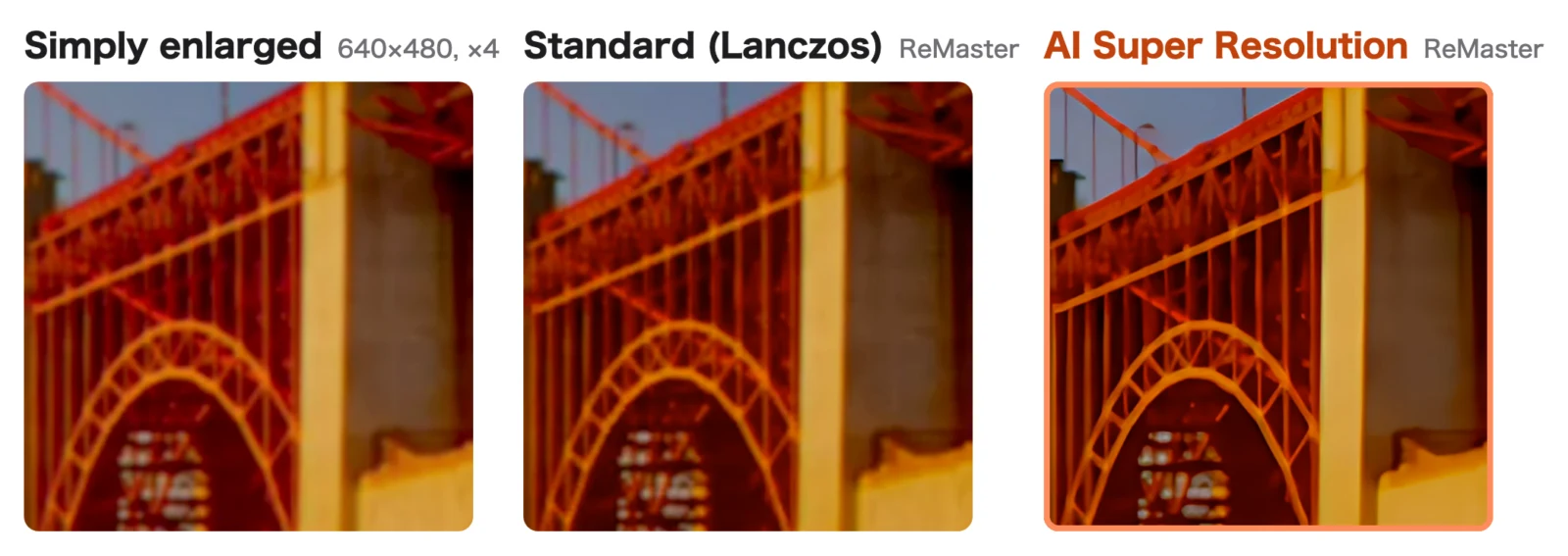
Super-resolution is a technique in which, when small footage is enlarged, AI estimates the lost detail and draws it in. Ordinary enlargement just fills the gaps between pixels with the surrounding colors, so the more you enlarge, the blurrier it gets. ReMaster’s AI Super Resolution uses an AI model called Real-ESRGAN to enlarge each frame 4× horizontally and vertically, then fits it to the size you chose.
Reduces blur and noise
Real-ESRGAN is an AI model trained to create sharp images from images with blur, noise and compression artifacts. As it enlarges, blocky compression artifacts and smeared edges also become less noticeable.
Smooths motion (frame interpolation)
Frame interpolation is a technique in which AI creates the frames in between from the frames before and after. ReMaster uses an AI model called RIFE to turn 30 fps videos into 60 fps, and 24 fps videos into 48 fps or 60 fps.
What can’t AI remastering do?
- What wasn’t captured can’t be brought back exactly: AI estimates the detail and draws it, so the details may differ from the actual scene. Check people’s faces and small text with particular care
- It doesn’t fix faded colors or colorize black-and-white footage: what ReMaster does is enlarge, sharpen and interpolate frames
- It doesn’t fix camera shake: shaky footage gets higher quality, but stays shaky
- Results depend on the source: the effect is easiest to see on footage that was fairly sharp to begin with, and badly blurred footage won’t change dramatically, even when enlarged
How AI remastering differs from a traditional remaster
| Traditional remaster | AI remaster | |
|---|---|---|
| Starting point | The original film or master tapes | The footage you have (DVDs, videotapes, video files, etc.) |
| Detail | Extracts the detail recorded in the original material | AI estimates the detail and draws it in |
| Who does it | Mainly rights holders and production companies | For your own videos, anyone, with an app |
Some official releases rescan the original film and then combine that with AI processing.
How can you AI-remaster your own videos?
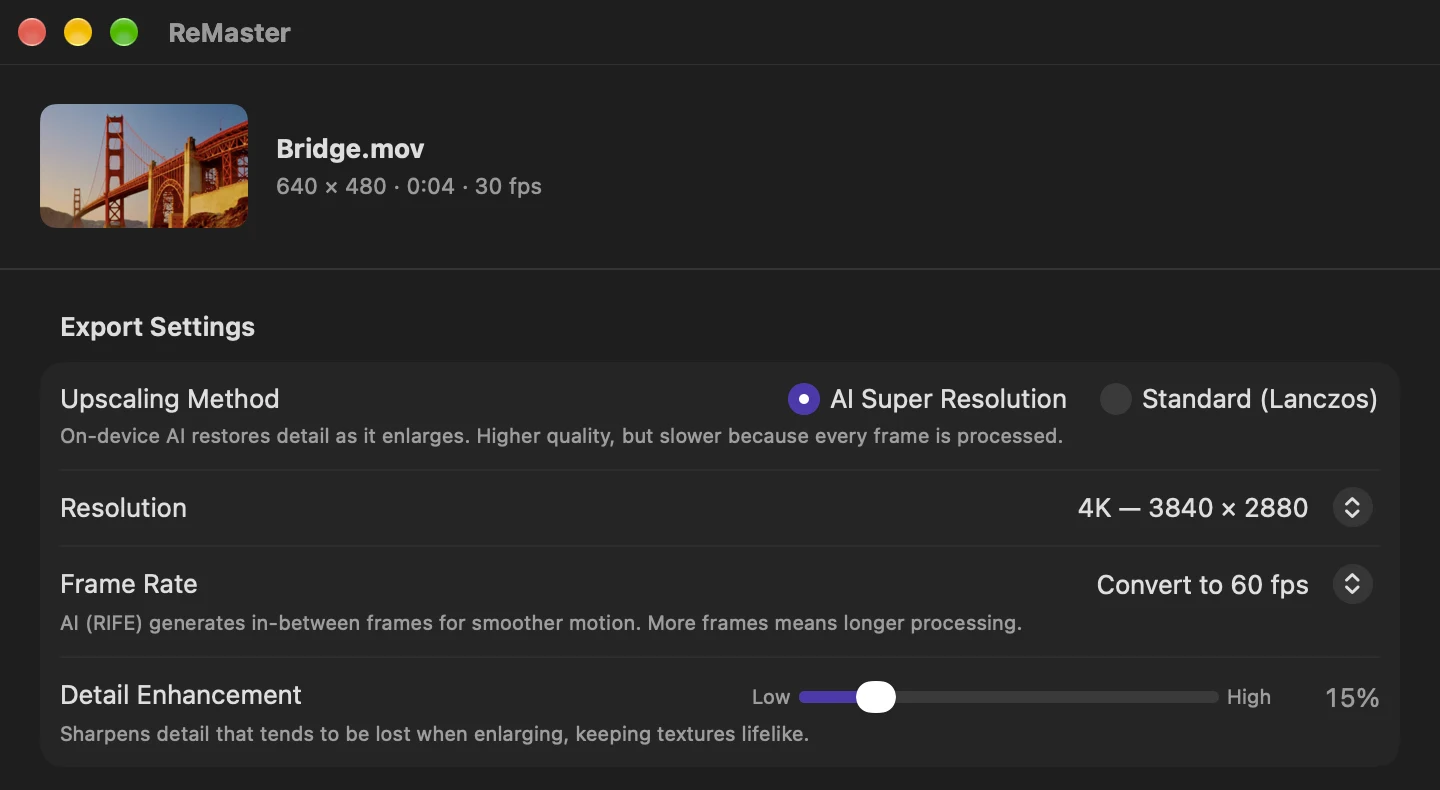
With ReMaster, you can do it on iPhone, iPad, Mac and Windows in these steps.
- Choose a video. On iPhone and iPad, pick it from the Photos app or Files; on Mac and Windows, drop it onto the window
- For Upscaling Method, choose “AI Super Resolution”, and for Resolution, choose an option such as “4K (long side 3840)”
- To make motion smoother, choose “Convert to 60 fps” for Frame Rate
- Press “Export”. Your original video stays as it is, and a new video is exported
All processing happens on your device, and your videos are never sent to a server. For the steps on iPhone and how it works, see How to enhance old videos on iPhone. For WMV and MPG videos from old camcorders, see How to enhance camcorder videos, and for AI-generated videos, see How to make AI-generated videos 4K at 60 fps.
Can you AI-remaster someone else’s footage and publish it?
Videos you shot yourself are yours to AI-remaster and use as you like. But copying and editing footage that someone else holds the rights to, such as movies, TV shows and music videos, and uploading it to video sites involves rights such as reproduction and uploading (public transmission), so you need the rights holder’s permission. Enhancing footage with AI doesn’t make the rights in the original footage go away (copyright basics, in Japanese).
How much does ReMaster cost, and what does it run on?
ReMaster is free to use. Videos exported with the free version get a ReMaster icon watermark in the center. Photos don’t. Buy ReMaster Premium, a one-time purchase, and videos are exported without the watermark too. There’s no subscription. It runs on iPhone and iPad with iOS / iPadOS 26 or later, on Mac with macOS 26 or later, and on Windows 11 (22H2 or later). Premium for Windows is purchased separately from the iPhone, iPad and Mac versions.
Frequently asked questions
What is an “AI remastered” version?
It’s old or low-quality footage that has been enhanced with AI. The AI raises the resolution and reduces blur and noise, and some titles also fill in frames to make motion smoother.
Can AI remastering reveal things that weren’t captured?
No. AI estimates the detail and draws it in, so even if it looks sharp, the details may differ from the actual scene.
How can I AI-remaster my own videos?
Use an AI video upscaler app. With ReMaster, just choose a video on iPhone, iPad, Mac or Windows, choose “AI Super Resolution” and a resolution, and export. Processing happens on your device.
Can I post AI-remastered videos to YouTube or other sites?
Videos you shot yourself are fine. To edit and publish footage that someone else holds the rights to, you need the rights holder’s permission.
Is ReMaster free to use?
Yes. ReMaster is free to use. Videos exported with the free version get a watermark in the center, and ReMaster Premium, a one-time purchase, removes it. There’s no subscription.
Summary
- An “AI remastered” version is old or low-quality footage enhanced with AI
- AI remastering raises the resolution with super-resolution, reduces blur and noise, and smooths motion with frame interpolation
- What wasn’t captured doesn’t come back exactly; the details are estimated and drawn by AI
- With ReMaster, you can bring your own videos up to 4K at 60 fps, entirely on your device