StoreMetrics is a Mac app for developers who ship apps for Apple platforms such as iPhone, iPad and Mac. It connects to the App Store Connect API so you can check daily downloads and sales, translate your store listing, manage screenshots and reviews, and see the effect of your ASO work, all in one window. It is free to download, and connecting your own account requires StoreMetrics Pro, a one-time purchase.
App Store Connect is in the middle of moving the data in Sales and Trends over to Analytics. If you check the previous day’s downloads and sales every morning, the way you check them is changing. With StoreMetrics, you can check the numbers for every app across multiple developer accounts simply by opening StoreMetrics on your Mac.

| Item | Details |
|---|---|
| Who it’s for | Developers who ship apps for Apple platforms such as iPhone, iPad and Mac |
| What it does | Checking daily downloads and sales, translating and submitting store listings, managing screenshots and reviews, checking the effect of ASO |
| Translation languages | All 39 App Store languages |
| Requirements (as of November 2026) | A Mac with macOS 26 or later |
| Price (as of November 2026) | Free to download. Connecting your own account requires StoreMetrics Pro, a one-time in-app purchase. No subscription |
| Free to try | Demo Mode lets you try every screen with sample data |
What is StoreMetrics?
Once you have apps on the App Store, there are many places to look in App Store Connect: sales in Sales and Trends, impressions in Analytics, store listings on a separate page for each language, and reviews on yet another page. StoreMetrics fetches all of this through the App Store Connect API and brings it together in one Mac app.
In particular, we built it to handle store listing translation and ASO (improving how people find your app on the App Store) in one place. You can translate and submit your listing, then see in the same app how impressions and downloads moved after the change.
What is happening to Sales and Trends in App Store Connect?
Apple is moving the data in Sales and Trends over to Analytics. For subscriptions, Apple’s help says that the new reports in Analytics replace the previous Sales and Trends subscription reports (Apple’s help page).
According to news reports, Apple plans to retire the subscription dashboards starting in mid-2026, then the remaining dashboards and reports in stages through 2027, and to remove Sales and Trends from App Store Connect once the transition is complete (Notebookcheck article).
StoreMetrics fetches sales and downloads from the App Store Connect API. If Apple changes how it provides this data, StoreMetrics will handle it in an update.
Why does simply checking downloads and sales every day help?
When you look at your app’s numbers every day, you notice changes. How downloads and sales moved after the day you released a new version, changed your listing or changed your price is much easier to see in daily figures.
In StoreMetrics, add a developer account with an App Store Connect API key and its apps appear in the sidebar. Select an account to see totals for downloads, proceeds, updates and in-app purchases, with a chart of daily trends. Select an app to go further, down to proceeds by currency, by country or region, and by type.
- Multiple developer accounts shown together in one sidebar
- Switch the period anywhere from 7 to 180 days
- Figures run through the previous day, for which sales reports are available
- No need to sign in to App Store Connect in a browser and move between pages
Open StoreMetrics on your Mac in the morning and check the previous day’s numbers. That alone helps you notice changes in downloads and sales sooner.
How do you translate a store listing with StoreMetrics?
StoreMetrics fetches your current app name, subtitle, description, keywords, promotional text and What’s New from App Store Connect, translates them into the language you choose, and shows the translation side by side with the original. It supports all 39 App Store languages, and it can also localize every language you have not added yet in one go.
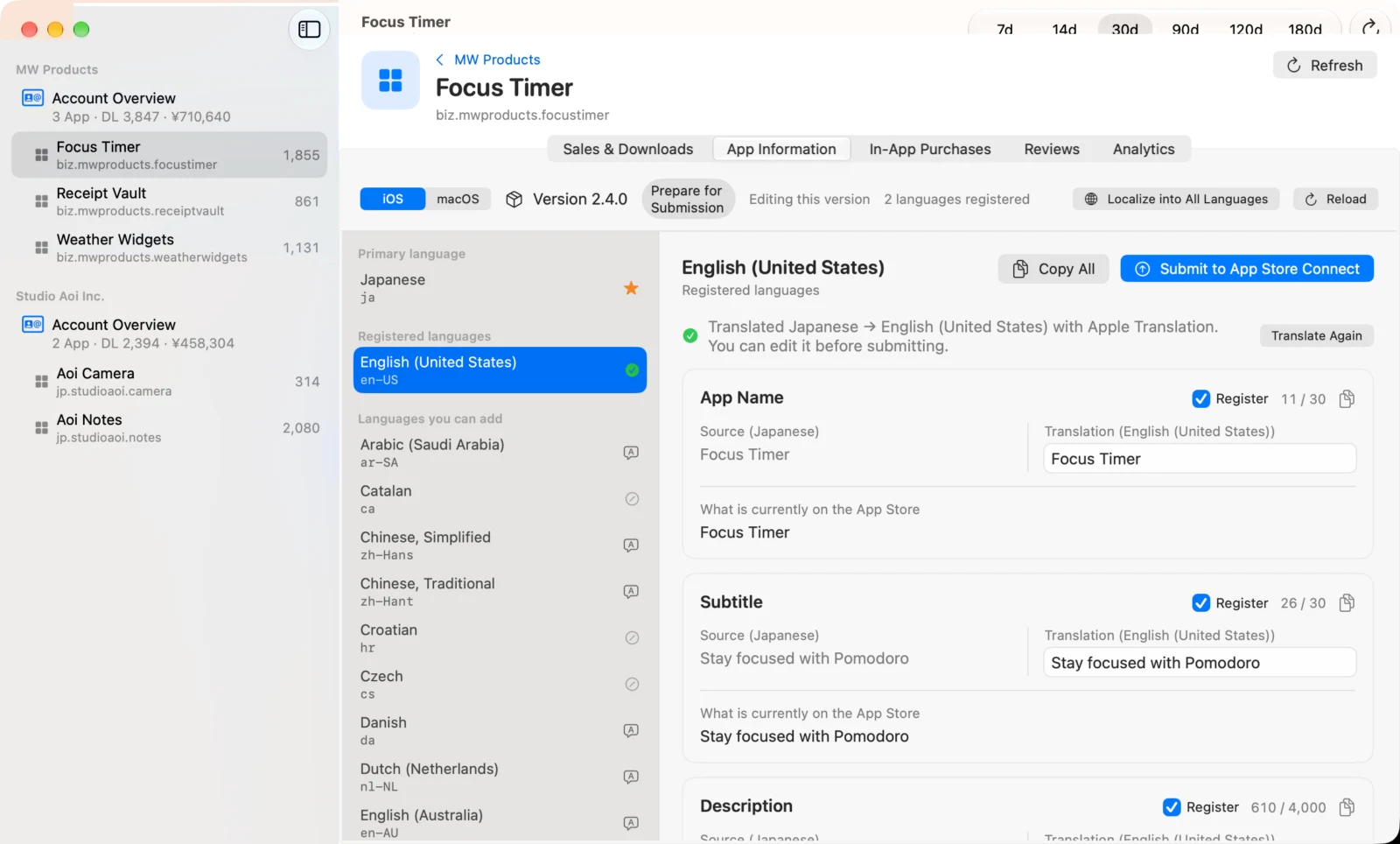
- For translation, choose Apple’s on-device translation (free, offline) or the Claude API
- Each field shows its character count against the App Store Connect limit. When a translation is too long, Apple Intelligence rewrites it to fit while keeping the meaning
- Keywords are trimmed to fit, starting with the lowest priority
- The app name stays in the primary language by default, so brand names are not mistranslated
- Display names and descriptions of in-app purchases and subscriptions can be translated and submitted the same way
- Only the fields you have reviewed and ticked are submitted to App Store Connect
Can StoreMetrics handle screenshots and reviews too?
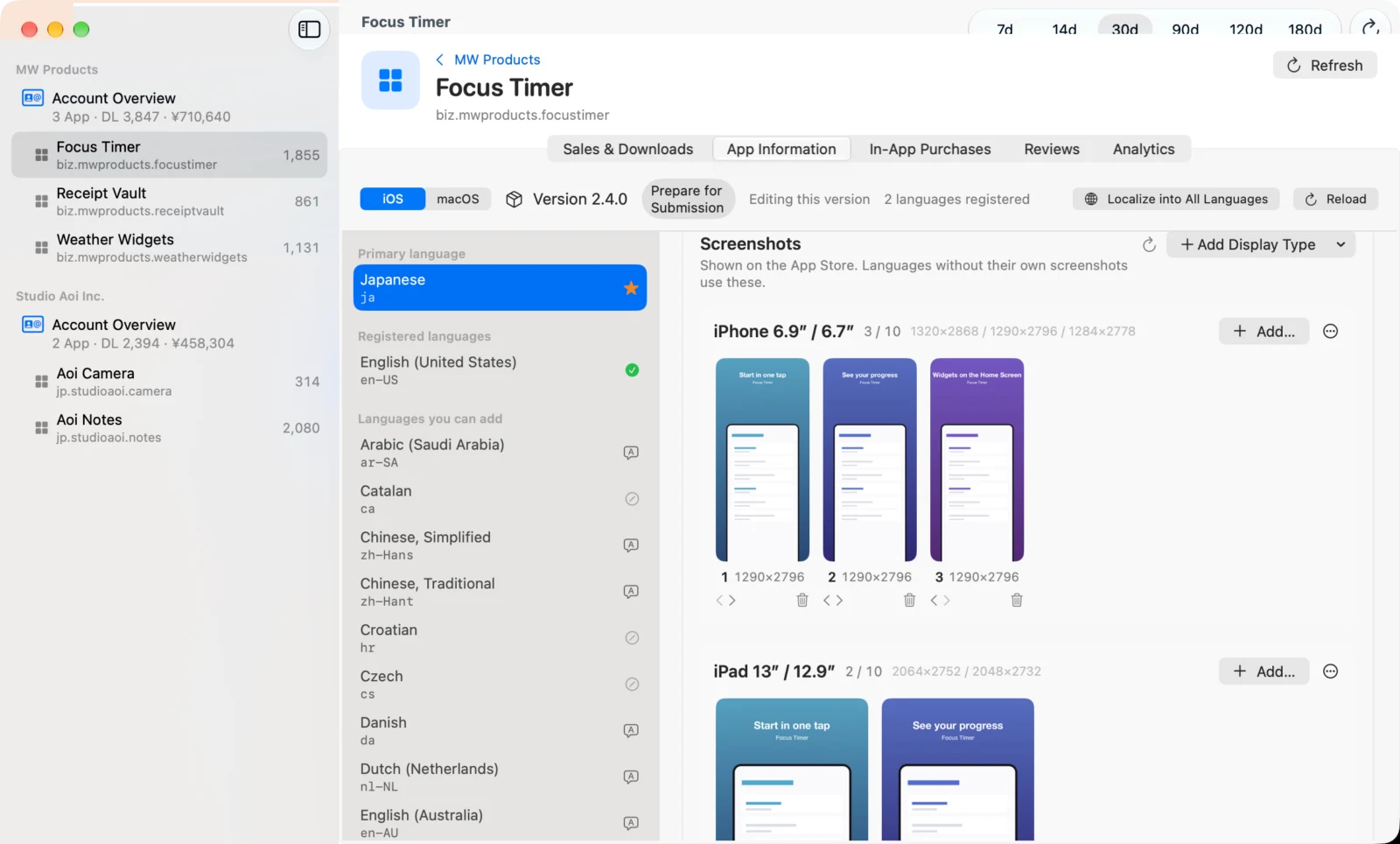
Yes. Below each language’s listing, the screenshots shown on the App Store are laid out by display (iPhone 6.9-inch, iPad 13-inch, Mac and so on). Drop images to add them, and reorder or delete them too. Before uploading, StoreMetrics checks the format and pixel size on your Mac.
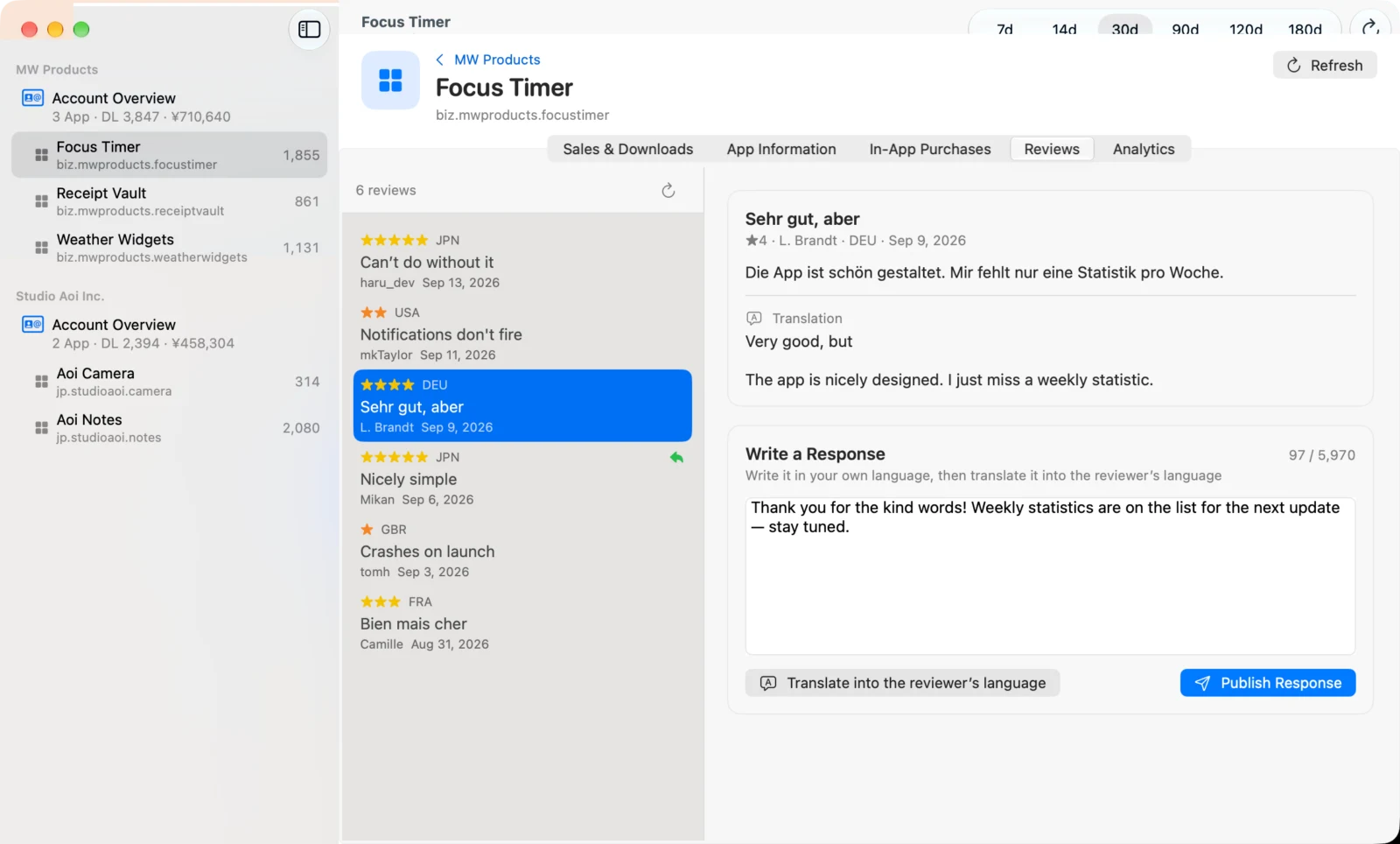
Customer reviews are shown translated into your language, and replies can be translated into the reviewer’s language before posting. Replies are public, so a confirmation screen appears before anything is sent.
How do you check the effect of ASO in StoreMetrics?
The ASO tab charts impressions, product page views, conversion rate, downloads and proceeds by day, with vertical lines marking listing changes and version releases. You can compare the 3, 7 or 14 days before and after a change as per-day values, which makes it easier to tell the effect of a change from day-to-day fluctuation.
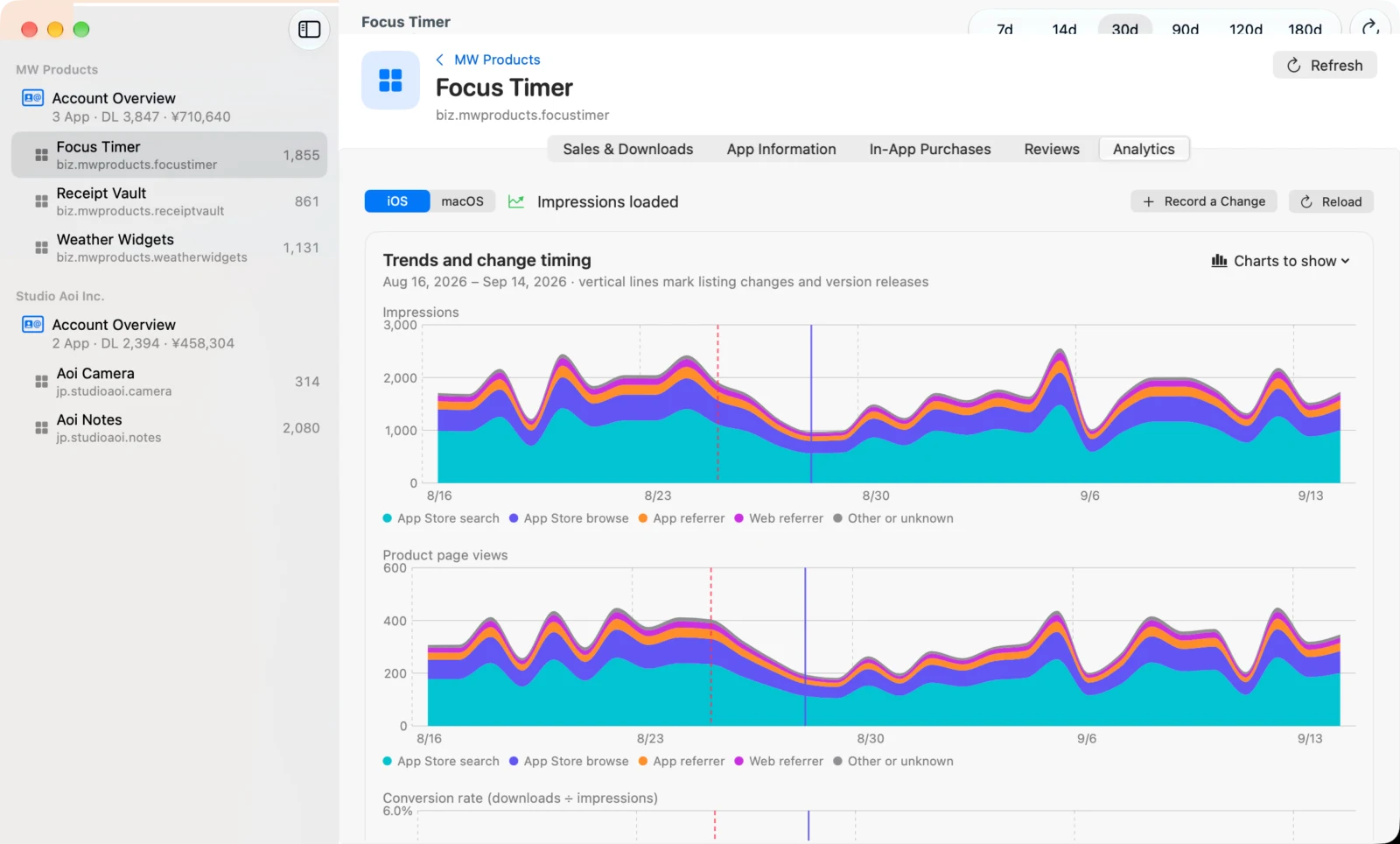
StoreMetrics takes care of the Analytics reports needed for impressions, from requesting them to fetching them. Changes submitted from StoreMetrics are recorded automatically. You can also hand the numbers and your listing to Apple Intelligence (or Claude) and get suggestions for improvement.
What do you need to start using StoreMetrics?
You need an API key issued in App Store Connect (Issuer ID, Key ID and the .p8 private key file) and your vendor number. Sales and downloads require at least Sales and Reports access, and using every feature, including fetching impressions, requires an Admin key. Even before you have a key, Demo Mode lets you try every screen with sample data.
The private key of your API key is stored only in your Mac’s Keychain. Translation and analysis run on your Mac unless you choose Claude. StoreMetrics writes to App Store Connect (submitting listings, uploading screenshots, replying to reviews) only when you have reviewed the content and taken the action yourself.
How much does StoreMetrics cost, and what does it run on?
StoreMetrics is available on the Mac App Store. It is free to download, and Demo Mode works as is. To connect your own App Store Connect account, you purchase StoreMetrics Pro, a one-time in-app purchase. It is not a subscription, and Restore Purchases lets you use it on your other Macs. It runs on macOS 26 or later. On-device translation and Apple Intelligence features depend on what your Mac supports (release announcement).
Frequently asked questions
If Sales and Trends disappears from App Store Connect, will I still be able to see sales in StoreMetrics?
StoreMetrics fetches sales and downloads from the App Store Connect API. If Apple changes how it provides this data, StoreMetrics will handle it in an update.
Can StoreMetrics show sales for multiple developer accounts together?
Yes. StoreMetrics brings every developer account you add with an App Store Connect API key into one sidebar. You can check totals and daily trends for each account, and downloads and proceeds for each app.
How many languages can StoreMetrics translate a store listing into?
StoreMetrics can translate your store listing into all 39 App Store languages. Translation runs with Apple’s on-device translation on your Mac or with the Claude API, and the text is checked against the character limits before it is submitted to App Store Connect.
Is StoreMetrics free?
StoreMetrics is free to download, and Demo Mode lets you try every screen with sample data. Connecting your own App Store Connect account requires StoreMetrics Pro, a one-time in-app purchase. It is not a subscription.
Does StoreMetrics change anything in App Store Connect on its own?
No. StoreMetrics submits listings, uploads screenshots and replies to reviews only when you have reviewed the content and taken the action.
Which Macs can run StoreMetrics?
StoreMetrics runs on Macs with macOS 26 or later. On-device translation and Apple Intelligence features depend on what your Mac supports.
Summary
- StoreMetrics is a Mac app for developers of apps on Apple platforms, and it works by connecting to the App Store Connect API
- You can translate store listings (into all 39 languages) and check the effect of ASO in one app
- As Sales and Trends moves to Analytics, being able to check daily downloads and sales on your Mac right away is useful in itself
- It is free to download, and connecting your own account requires StoreMetrics Pro, a one-time purchase. It runs on macOS 26 or later