To use a calendar on Windows today, you have three options: new Outlook, a browser, or a dedicated app. Support for the Windows Calendar app ended on December 31, 2024, and it can no longer send or receive events. If you use Outlook or Microsoft 365 calendars, its successor, new Outlook, is all you need.
Using Google Calendar simply on Windows, outside a browser, has become harder than it used to be. That doesn’t mean it has stopped working. But new Outlook also syncs your email and contacts, classic Outlook doesn’t support Google Calendar, and Google has no official Windows app. This article explains why, and how to choose based on how you use your calendar (information checked in November 2026).
What happened to the Windows Calendar app?
According to Microsoft, support for Windows Mail, Calendar, and People ended on December 31, 2024. These apps can no longer send or receive email or events. Microsoft recommends moving to new Outlook or Outlook.com (Microsoft’s explanation).
- New Outlook is free: Microsoft says it’s free for everyone to use
- New Windows 11 devices come with it: it ships as the default mail app
- You can move your old data: email, events and contacts still stored on your computer can be exported and imported into new Outlook
In other words, the calendar on Windows has gone from a standalone Calendar app to one screen inside Outlook, an email app. Inside Outlook, that screen is also called Calendar.
How do the calendar options on Windows compare?
| Option | Cost | Best for | What about Google Calendar? |
|---|---|---|---|
| New Outlook | Free | People who use Outlook.com or Microsoft 365 calendars | Can be added. Syncs a copy of your email, events and contacts with Microsoft’s data centers |
| Classic Outlook | Included in Microsoft 365 and other products | People whose company uses classic Outlook | Not supported. Only work and school Google accounts can use Google’s sync tool |
| Browser | Free | People who open Google Calendar now and then | All features are available |
| “Install as app” in Chrome or Edge | Free | People who want it out of their tabs | Opens in a separate window, but it’s the same web page |
| Secret address in iCal format | Free | People who only need to view one calendar | Read-only. No editing |
| Thunderbird | Free | People who use Thunderbird for email | Can sync. Requires a setting on the Google side first |
| Galna Calendar | Free for 7 days, then a one-time purchase | People who use Google Calendar every day | Google Calendar only. Doesn’t sync email |
Why has Google Calendar become harder to use on Windows?
There are four reasons.
- The app where you could simply add a Google account is gone: the old Calendar app let you add a Google account, just like Windows Mail, and show your events. That option, which needed nothing beyond the apps built into Windows, stopped working when support ended
- New Outlook doesn’t sync just your calendar: according to Microsoft, a copy of your email, events and contacts syncs between your email provider and Microsoft’s data centers (Microsoft’s explanation). Even if you “just want to see your events,” you end up opening an email app with Gmail in it
- Classic Outlook doesn’t support Google Calendar: Microsoft itself says classic Outlook had no support for Google Calendar and contacts (Microsoft’s announcement). Google’s sync tool, GWSMO, is for work and school accounts and doesn’t work with a personal @gmail.com account (Google’s explanation)
- Google has no official Windows app: Google Calendar is a web service. Even if you install it as an app in Chrome or Edge, it’s the same web page inside
Meeting features differ too. In new Outlook, you can’t check the availability of people on Google Calendar, and adding a Google Meet link requires an add-in (our article comparing the browser and Outlook).
To sum up, Google Calendar hasn’t stopped working on Windows. What’s gone is the standard path of “sign in with your Google account and use only the calendar.” Today you either bring your email into Outlook too, go back to the browser, or choose another app.
By use case: which calendar is right for you?
- You mainly use Outlook or Microsoft 365 calendars → new Outlook (if your company uses classic Outlook, you can stay on it)
- You want Gmail and your events together in Outlook → add your Google account to new Outlook
- You only look at Google Calendar now and then → the browser. Installing it as an app gets it out of your tabs
- You just want to view one calendar in another app → the secret address in iCal format
- Your email app is Thunderbird → add it to Thunderbird
- You add events to Google Calendar every day and also set up meetings → Galna Calendar, a dedicated app
What are the steps to use Google Calendar on Windows?
Add your Google account to new Outlook
- Open new Outlook and go to Accounts in Settings
- Add an account, enter your Gmail address, and allow access on Google’s sign-in screen
- Open Calendar, and your Google Calendar events appear
Install Google Calendar from your browser as an app
- Open calendar.google.com in Chrome or Edge
- From the browser’s menu, install the page as an app (the name of the menu item varies slightly by browser and version)
- Pin the new icon to the taskbar
View only, with the secret address in iCal format
In Google Calendar’s settings, open “Integrate calendar” for the calendar you want, copy the “Secret address in iCal format,” and paste it into another app. It’s read-only and shows only that calendar (Google’s explanation). Anyone who knows this address can see your events, so don’t share it with anyone. If it leaks, you can reset it in the same settings.
Add it to Thunderbird
Thunderbird, the free email app, can also sync Google Calendar. First choose which calendars to sync on the Google side, then add the calendar in Thunderbird (Mozilla’s explanation).
What is Galna Calendar, the app made just for Google Calendar?
Galna is a Windows and Mac app we built just for Google Calendar. On the Microsoft Store it’s called Galna Calendar. Sign in with your Google account, and you can check, create and edit events without opening a browser. It has no email. Galna is not an official Google app.
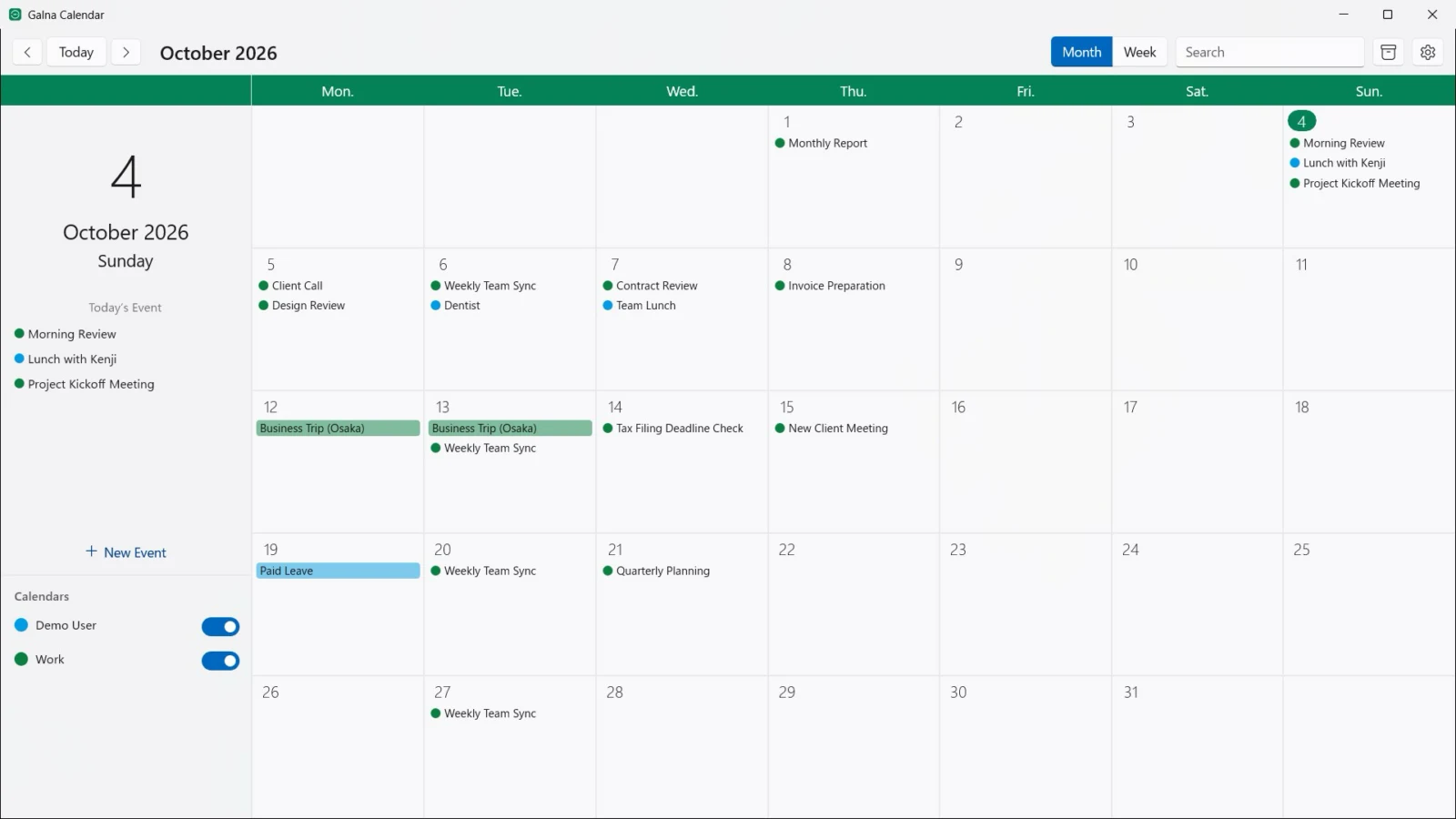
- Just your calendar: it doesn’t sync email or contacts. It shows only Google Calendar, so events from Outlook.com or Microsoft 365 don’t get mixed in
- Your data goes only between your computer and Google: events are stored on your computer and sync directly with Google’s services. They are never copied to our servers or to another company’s cloud
- It handles what meetings need: “Find a Time” checks all attendees’ availability (learn more), and you can create Google Meet links and reply to invitations
- Quick to open: check today’s events from the notification area, and event notifications arrive as Windows notifications
- A window for each account: open separate windows side by side for each Google account, such as work and personal
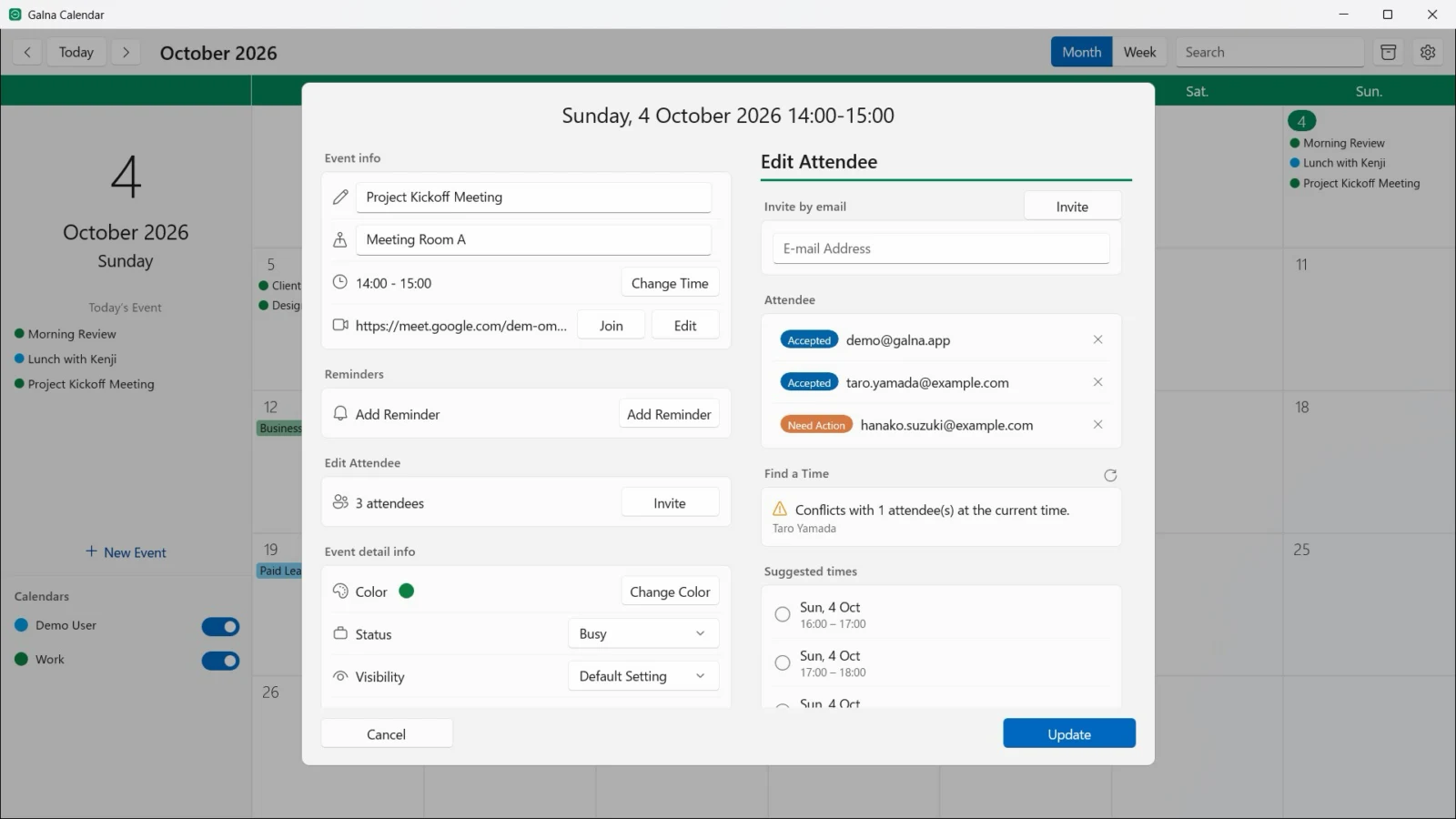
It runs on PCs with Windows 11 version 22H2 or later (x64 and Arm64). All features are free for the first 7 days, and after that it’s a one-time purchase, separate from the Mac version (announcement of the Windows version).
Galna Calendar works only with Google Calendar. If you want to see your Outlook.com or Microsoft 365 events too, new Outlook is the better fit.
Frequently asked questions
Can I still use the Windows Calendar app?
Support ended on December 31, 2024, and it can no longer send or receive events or email. Email, events and contacts still stored on your computer can be exported and imported into new Outlook.
Is new Outlook free?
Yes. Microsoft says it’s free for everyone to use, and new Windows 11 devices include it as the default mail app.
Can I use Google Calendar in new Outlook?
Yes. Add your Google account, and your Google Calendar events appear. When you do, a copy of your email, events and contacts syncs with Microsoft’s data centers.
Can I use Google Calendar in classic Outlook?
Microsoft says classic Outlook had no support for Google Calendar. Work and school Google accounts can use Google’s sync tool, GWSMO, but it doesn’t work with a personal @gmail.com account. If you only need to view your events, you can use the secret address in iCal format.
Is there an official Google Calendar app for Windows?
No. Google Calendar is a web service, and even if you install it as an app in Chrome or Edge, it’s the same web page inside.
Can I use only Google Calendar in a Windows app, without syncing email?
Yes, with an app made just for Google Calendar. Our app, Galna Calendar, doesn’t sync email or contacts and handles only Google Calendar. You can try it free for 7 days, and after that it’s a one-time purchase.
Is Galna Calendar an official Google app?
No. It’s made by MW Products. You sign in with your Google account and use your Google Calendar events.
Summary
- Support for the Windows Calendar app ended on December 31, 2024, and its successor is new Outlook
- If you use Outlook or Microsoft 365 calendars, new Outlook is all you need
- Google Calendar still works on Windows, but the standard way to simply use just the calendar is gone
- The browser works if you only look now and then, and a dedicated app is an option if you use it every day